First things first. Create an account and log in to GitHub [Link].
Go to Settings > SSH and GPG Keys > Add SSH Key.
Give it a meaningful name and paste your SSH Public Key.
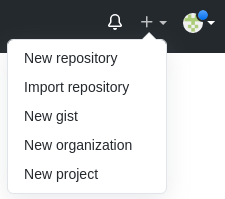
Create a New Repository. It can be public or private.
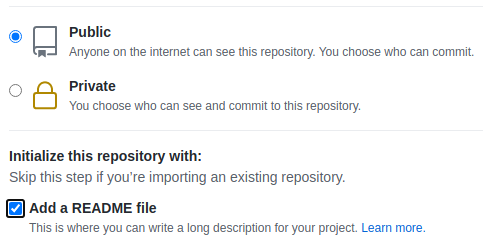
It is always good to Add a README.md file.
Add a description and instructions about the repo in the README.md file and save.
Then click Download Code, select SSH, and copy the URL:
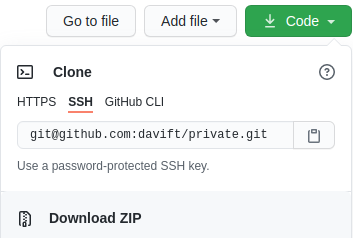
On your Linux terminal, where you have the private key that matches the uploaded public key, run the following command to clone the repository:
git clone [email protected]:user/private.git
Pull changes from remote to local:
git pull
git pull --verbose
Set your Git identity so you can commit changes to your repositories:
git config --global user.email "Your E-Mail"
git config --global user.name "Your Name"
cat ~/.gitconfig
To set your identity for a specific repository only:
git config user.email "Your E-Mail"
git config user.name "Your Name"
Modify the text in the README.md file you cloned from the repository and save.
Check the status of the local repository against the remote:
git status
Output:
...
modified: README.md
...
Check what changed:
git diff
git diff --staged
git diff --staged README.md
git diff --cached README.md
git diff file1.txt file2.txt
git diff COMMIT1-ID COMMIT2-ID
git --no-pager diff COMMIT1-ID COMMIT2-ID
Commit and push the changes to the remote repository:
git add README.md
git commit -m "message about the update"
git commit --amend -m "Updating message for the previous commit"
git add anotherFile.txt
git commit --amend --no-edit
git push
Remove one file or all files from the staging area:
git reset README.md
git reset
Verify the updates on GitHub.
To create a repository locally, first create a folder, change into it, then run:
git init
git remote add origin [email protected]:user/private2.git
git remote -v
git push -u origin master
git push -u origin branchName
Check which branch you are on:
git branch
List all branches, including remote ones:
git branch -a
Create a branch:
git branch firstBranch
Create a branch and switch to it:
git checkout -b firstBranch
To push the branch to remote for the first time:
git push --set-upstream origin firstBranch
Note: –set-upstream is the same as -u used previously.
To delete a branch locally (safe way):
git branch -d firstBranch
Force delete a local branch, discarding all its changes:
git branch -D firstBranch
Delete the branch on the remote:
git push origin --delete firstBranch
Show the differences between the current branch and another:
git diff firstBranch
Merge the branch into master:
git merge firstBranch
Switch to another branch:
git checkout master
Rename or move files:
git mv fileName.txt fileNewName.txt
git mv dir1/fileName dir2/
List all commits:
git log
git log -p
git log --all --graph --oneline --decorate
View a specific commit:
git show b82ed4bb1a7dbe3ce291af17e73721dbe0c40011
git show b82ed4
Discard uncommitted changes to a file:
git checkout -- fileName
Revert the last commit (creates a new commit that undoes the changes):
git revert HEAD
Undo the last commit:
git reset HEAD
Revert a specific commit:
git reset 79645cdce5ef42595fee98306b9644c93f098e55
Or:
git reset --hard 79645cdce5ef42595fee98306b9644c93f098e55
Stash your changes to work on something else without committing:
git stash
List all stashed changes:
git stash list
Show what is in the stash:
git stash show
Restore stashed changes:
git stash apply
Search for a string across all commit history:
git log -S 'text' --source --all
Search using a regular expression:
git log -G "regex expression" --source --all
Squash all commits into one (use with caution):
git rebase --root -i
Remove a file from Git’s index. The --cached flag stops tracking the file without deleting it from your local filesystem:
git rm --cached .aws/credentials
Set a custom timestamp for a commit:
GIT_AUTHOR_DATE="2024-01-15T10:30:01" GIT_COMMITTER_DATE="2024-01-15T10:30:01" git commit -m "Initial commit."
BONUS
Use Sandfly’s SSH Hunter to audit SSH keys. It is not open source, but this agentless tool can help you visualize what SSH keys exist in your system and how they are being used, including orphaned or unauthorized keys [Link].
Create your own Private Git Server [Link].