When the network grows and traffic increases, the trunks between switches start to become the weak point of the system.
If this single cable breaks, all communication is lost, and all traffic shares the bandwidth of only one port:
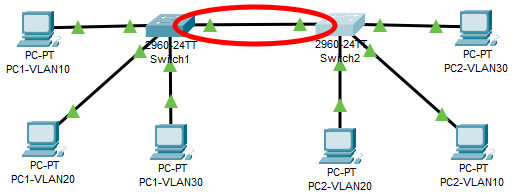
Simply adding another cable does not fully solve the problem:
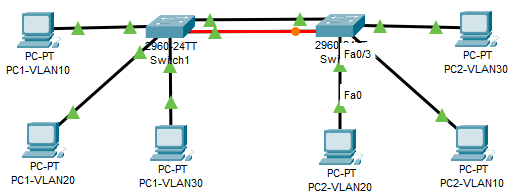
STP will automatically block one of the ports to prevent loops, so traffic is still limited to one port, with the second serving only as a spare in case the primary fails.
EtherChannel creates one virtual interface made up of up to 8 ports. The resulting connection speed equals the sum of each port’s bandwidth.
Switch1
enable
configure terminal
no ip domain lookup
line con 0
logging synchronous
hostname Switch1
Switch2
enable
configure terminal
no ip domain lookup
line con 0
logging synchronous
hostname Switch2
Set EtherChannel Static:
Switch1
interface range g0/1-2
channel-group 1 mode on
Switch2
interface range g0/1-2
channel-group 1 mode on
Set EtherChannel to negotiate via PAgP protocol (Cisco):
Switch1
interface range g0/1-2
channel-group 1 mode desirable
Switch2
interface range g0/1-2
channel-group 1 mode desirable
OR
interface range g0/1-2
channel-group 1 mode auto
Set EtherChannel to negotiate via LACP protocol:
Switch1
interface range g0/1-2
channel-group 1 mode active
Switch2
interface range g0/1-2
channel-group 1 mode active
OR
interface range g0/1-2
channel-group 1 mode passive
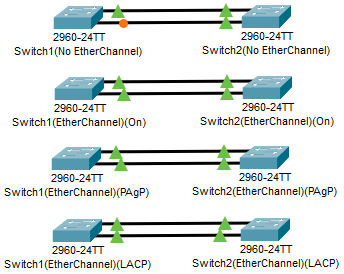
No EtherChannel:
– Single port speed
– 1 spare port
EtherChannel:
– Combined port speed
– No dedicated spare port, but if one link goes down the other carries the traffic.
Mode Definitions:
- ON – ON
- Forces link aggregation without negotiation.
- Desirable – Desirable
- Both sides initiate negotiation and form the link.
- Desirable – Auto
- One side initiates negotiation and the other responds to form the link.
- Auto – Auto
- Both sides wait and will NOT initiate negotiation, so the link will NOT form.
- Active – Active
- Both sides initiate negotiation and form the link.
- Active – Passive
- One side initiates negotiation and the other responds to form the link.
- Passive – Passive
- Both sides wait and will NOT initiate negotiation, so the link will NOT form.
To verify the configuration on each switch, use the following commands:
show spanning-tree
show etherchannel summary
show interfaces port-channel 1
EtherChannel can also be used on access ports, but it is most commonly applied to trunk ports since they are the natural bottleneck for traffic.