People who are censored can use Snowflake proxies, which are run by volunteers, to access the Internet through the Tor network.
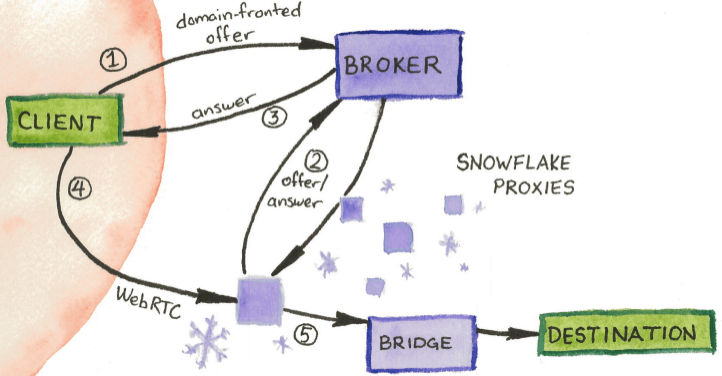
It uses WebRTC to create peer-to-peer connections across NATs and firewalls, and does not provide direct access to the Internet.
Volunteers can install a browser extension, enable the badge below, or embed it on any website to recruit more volunteers:
<iframe src="https://snowflake.torproject.org/embed.html" width="320" height="240" frameborder="0" scrolling="no"></iframe>
DEPLOYING A LINUX STANDALONE HEADLESS SNOWFLAKE
sudo apt install docker.io -y
sudo docker run --name SnowFlake -d --restart unless-stopped --network host thetorproject/snowflake-proxy:latest
Check the Snowflake running in a Docker container:
sudo docker ps -a
Stop and start the container with the following commands, replacing hash with the container ID:
sudo docker stop 8537758ce665
sudo docker start 8537758ce665
It may take some time before connections start going through your server, but they will eventually:
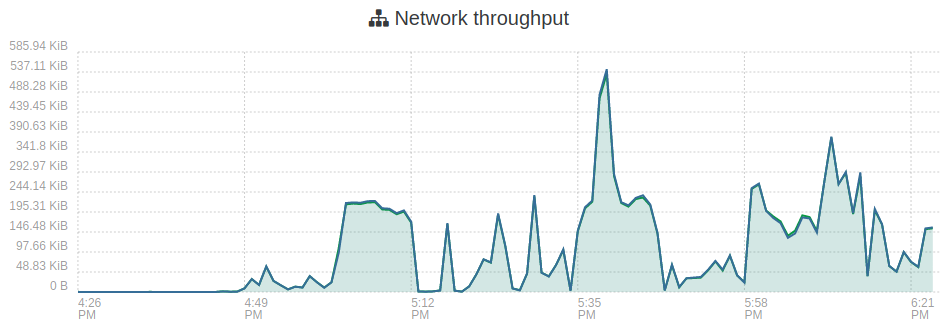
MONITORING NETWORK TRAFFIC
sudo apt install iptraf -y
sudo iptraf-ng
For more information about Snowflake, visit [Link].
One alternative to Tor is the Chrome extension UltraSurf [Link], a free proxy network that lets you bypass state censorship with a single click.