Logical Volume Management (LVM) is a method of allocating space on mass-storage devices.
It can provide features superior to traditional partitioning schemes, such as concatenating, striping, or combining partitions, and resizing or moving partitions, potentially without rebooting.
Some related commands that will help alongside the LVM commands are:
lsblk
blkid /dev/mapper/lg_name-lv_name
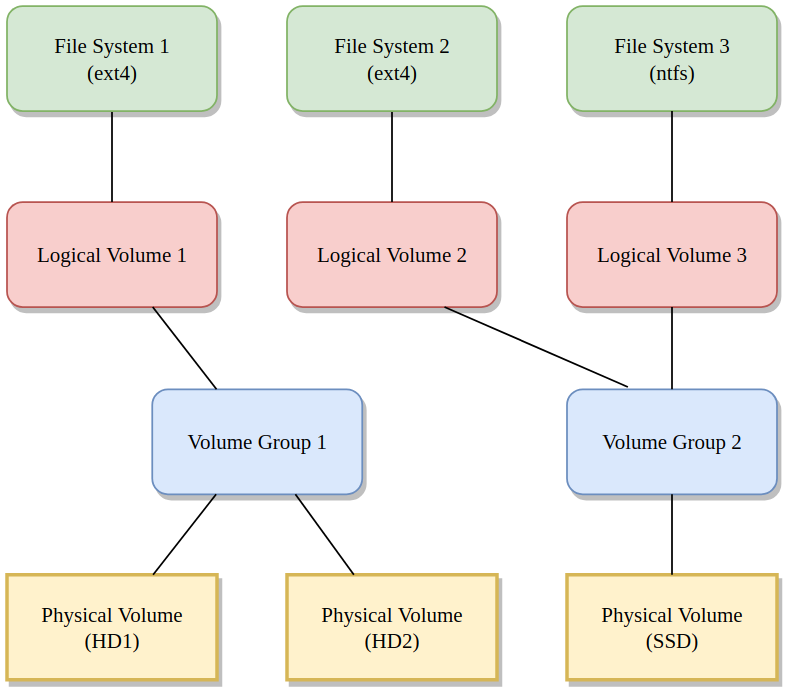
Displaying information:
pvdisplay
vgdisplay
lvdisplay
lvs
Adding a new physical device to extend an existing Logical Volume:
pvcreate /dev/sdb
vgextend vg_name /dev/sdb
lvextend -L +5G /dev/mapper/lg_name-lv_name
resize2fs /dev/mapper/lg_name-lv_name
Extending an existing Logical Volume to fill the entire Volume Group:
lvextend --resizefs -l +100%FREE /dev/mapper/lg_name-lv_name
Creating new Logical Volumes on a new Volume Group:
vgcreate vg2_name /dev/sdc
lvcreate vg2_name -L 10G -n lv2_name
mkfs.ext4 /dev/mapper/vg2_name-lv2_name
lvcreate vg2_name -L 10G -n lv3_name
mkfs.ext4 /dev/mapper/vg2_name-lv3_name
lvcreate /dev/mapper/vg2_name-lv3_name -L 5G -s -n lv3_snapshot
mount /dev/mapper/vg2_name-lv3_snapshot /mount_point/
lvconvert --merge /dev/mapper/vg2_name-lv3_snapshot
lvchange -an /dev/mapper/vg2_name-lv3_name
lvchange -ay /dev/mapper/vg2_name-lv3_name
BONUS
Here is a quick step-by-step that should work on default Ubuntu installations that have LVM on the root volume.
df -h
lsblk
blkid /dev/mapper/ubuntu--vg-ubuntu--lv

pvdisplay
growpart /dev/vda 3
pvdisplay

vgdisplay ubuntu-vg
lvextend -l +100%FREE /dev/ubuntu-vg/ubuntu-lv
lvdisplay /dev/ubuntu-vg/ubuntu-lv
vgdisplay ubuntu-vg

df -h
resize2fs /dev/ubuntu-vg/ubuntu-lv
df -h