The choice between NFS and Samba depends on who you are sharing with. Linux supports both NFS and Samba, but Windows only supports Samba.
To learn about Samba file sharing, read the following post: SAMBA Server and Client on Ubuntu (18.04~24.04 LTS) [Link].
SERVER – NFS CONFIG
sudo apt update
sudo apt install nfs-kernel-server rpcbind -y
sudo ufw allow nfs
sudo nano /etc/exports
Add this line at the end of the file:
/home/ubuntu 192.168.2.0/24(rw,sync,no_subtree_check)
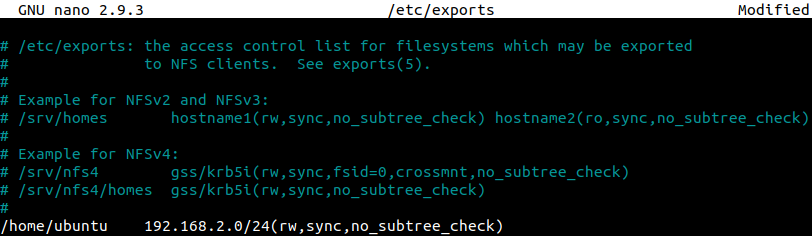
Customize the line to match your network:
| /home/ubuntu | The directory being shared. |
| 192.168.2.0/24 | Your network ID (check your network). |
| rw | Read and Write (ro would be Read Only). |
To find your network address, run:
hostname -I
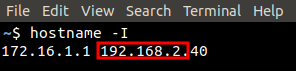
Ignore any IP starting with ‘127‘. Use the first three octets of your IP to replace ‘192.168.2‘.
sudo systemctl restart nfs-kernel-server
sudo systemctl status nfs-kernel-server
OR
sudo service nfs-kernel-server restart
sudo service nfs-kernel-server status
Once the service is running, apply any changes made to /etc/exports with:
sudo exportfs -ra
To check the shares on an NFS server locally:
showmount -e
CLIENT – NFS MOUNT
sudo apt update
sudo apt install nfs-common -y
Check connectivity:
showmount -e 192.168.2.40
To mount a remote share to a local directory:
sudo mount 192.168.2.40:/home/ubuntu /tmp/file-server
Customize the command to match your network:
| 192.168.2.40 | IP address of the server. |
| /home/ubuntu | The directory being shared on the server. |
| /tmp/file-server | Local mount point. |
The directory ‘/tmp/file-server‘ must exist on the local file system. If it does not, run:
sudo mkdir /tmp/file-server
sudo chmos 755 /tmp/file-server
To unmount the share from the local computer:
sudo umount /tmp/file-server
To automatically mount on boot:
sudo nano /etc/fstab
Add this line at the end of the file:
192.168.2.40:/home/ubuntu /tmp/file-server nfs auto,nofail,noatime,nolock,intr,tcp,actimeo=1800 0 0
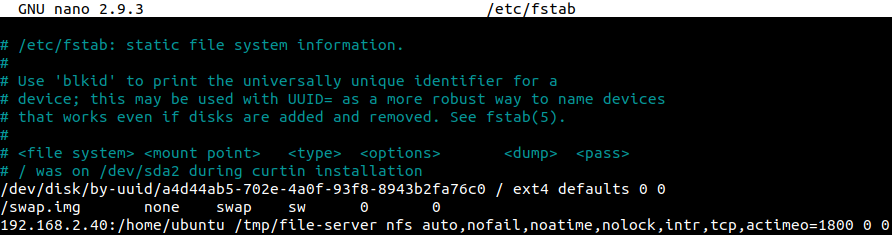
Customize the line to match your network:
| 192.168.2.40 | IP address of the server. |
| /home/ubuntu | The directory being shared on the server. |
| /tmp/file-server | Local mount point. |
| nfs | Specifies the protocol ‘nfs‘. |
| auto,nofail,noatime,nolock, intr,tcp,actimeo=1800 0 0 |
Keep these arguments as they are. |
Restart the client and verify that the share was automatically mounted.
BONUS
For mobile systems such as laptops, traditional NFS mounts block I/O when the server becomes unreachable (e.g., when you leave home), which can cause the system to hang. AutoFS is a more robust solution for intermittent connectivity [Link].
sudo apt install autofs -y
echo '/mnt/ /etc/auto.nfs --timeout=120' | sudo tee -a /etc/auto.master
sudo nano /etc/auto.nfs
Add entries following the example below.
sharemount -fstype=nfs4,rw,soft,intr,timeo=5,retrans=2 192.168.1.10:/export/share
Reload the configuration.
sudo systemctl restart autofs
Note: a directory called /mnt/sharemount will be created, and the remote share will be mounted automatically whenever you access that path.
ls /mnt/sharemount
Or
cd /mnt/sharemount
Then verify.
df -h | grep /mnt/sharemount