Directly interacting with a model through its API is the most effective way to integrate AI capabilities into real-world applications, services, and automation workflows.
Among many other features, it can be safely integrated with CI pipelines to supplement human code review and to improve the clarity, summarization, and readability of outputs.
Note that I did not mention any sophisticated or advanced agentic use of AI, nor did I suggest granting it any autonomy. I do not believe current AI tools are mature enough for that level of trust.
- cURL
- Python
- JavaScript
CURL
Optionally, list models available remotely via the API.
curl http://192.168.1.101:11434/api/tags | jq
Pull and delete a model remotely.
curl http://192.168.1.101:11434/api/pull -d '{
  "model": "qwen2.5-coder:1.5b-base",
  "stream": false
}'
curl -X DELETE http://192.168.1.101:11434/api/delete -d '{
  "model": "qwen2.5-coder:1.5b-base"
}'
Refer to the official Ollama documentation for additional details and endpoints [Link].
Using a model remotely.
In a previous post [Link], we installed Ollama and tested it with curl from a remote host using the following command.
curl -s http://192.168.1.101:11434/api/generate -d '{
  "model": "qwen2.5-coder:1.5b-base",
  "prompt": "When was Python3 first released?",
  "stream": false
}'
Example output.
{
  "model": "qwen2.5-coder:1.5b-base",
  "created_at": "2026-02-07T01:34:02.891211247Z",
  "response": "",
  "done": true,
  "done_reason": "stop",
  "context": [
    <redacted_for_brevity>
  ],
  "total_duration": 260501788901,
  "load_duration": 2392809850,
  "prompt_eval_count": 7,
  "prompt_eval_duration": 687966008,
  "eval_count": 1065,
  "eval_duration": 253858547320
}
Use jq to filter the response and glow for better terminal rendering. You can also combine instructions with the request.
curl -s http://192.168.1.101:11434/api/generate -d '{
  "model": "qwen2.5-coder:1.5b-base",
  "prompt": "Instruction: Be brief, use markdown. \n\n Question: When was Python3 first released?",
  "stream": false
}' | jq -r '.response' | glow
Explanation
- Instruction
- System requirements, guidelines, controls.
- Question
- User inputs, questions, prompts.
You can also adjust parameters for more “creative” (less predictable) responses.
curl -s http://192.168.1.101:11434/api/generate -d '{
  "model": "qwen2.5-coder:1.5b-base",
  "prompt": "Instruction: Be brief, use markdown. \n\n Question: When was Python3 first released?",
  "options": [{
    "temperature": 0.3,
    "num_predict": 50,
    "top_p": 0.9
  }],
  "stream": false
}' | jq -r '.response' | glow
Explanation
- temperature
- Controls randomness (0.0 is focused, 1.0+ is creative).
- num_predict
- Limits the maximum tokens generated.
- top_p
- Influences the diversity of the response.
Create a wrapper script to call it easily from the terminal.
nano ai.sh && chmod +x ai.sh
#!/bin/bash
API_URL="http://192.168.1.101:11434/api/generate"
MODEL="qwen2.5-coder:1.5b-base"
SYSTEM_INSTRUCTIONS="Instruction: Be brief, use a single paragraph, and use markdown."

QUESTION="$*"
if [ -z "$QUESTION" ]; then
    echo "Usage: ./ai.sh Tell me a joke about a turtle."
    exit 1
fi

PAYLOAD=$(jq -n --arg model "$MODEL" --arg prompt "$SYSTEM_INSTRUCTIONS \n\nQuestion: $QUESTION" '{model: $model, prompt: $prompt, stream: false}')
curl -s "$API_URL" -d "$PAYLOAD" | jq -r 'select(.response != null) | .response' | xargs -0 printf '%b' | glow
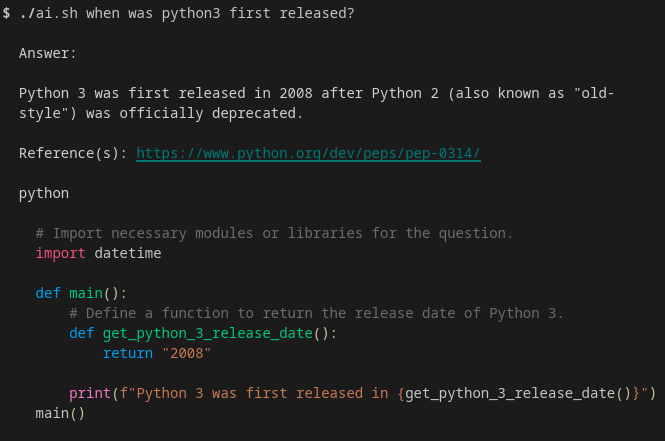
To run it from anywhere (also removing the file extension).
sudo mv ai.sh /usr/bin/ai
For a chat-like experience, this script prints tokens to the screen as they arrive and disables reasoning.
#!/bin/bash
API_URL="http://192.168.1.101:11434/api/chat"
MODEL="yi-coder:9b"
SYSTEM="Be brief, answer directly, and use literal newlines."

USER="$*"
if [ -z "$USER" ]; then
    echo "Usage: ./ai.sh Tell me a joke about a turtle."
    exit 1
fi

# Constructing the JSON with a messages array
PAYLOAD=$(jq -n --arg model "$MODEL" --arg sys "$SYSTEM" --arg user "$USER" '{ model: $model, messages: [ {role: "system", content: $sys}, {role: "user", content: $user} ], stream: true, "think": false }')

echo '---'
curl -N -s "$API_URL" -d "$PAYLOAD" | jq --unbuffered -rnj 'inputs | .message.content' ; echo ""
echo '---'
PYTHON [Link]
Set up the virtual environment.
sudo apt install python3-venv -y
python3 -m venv .venv
source .venv/bin/activate
pip3 install ollama
Write the code.
#!/usr/bin/env python3
from ollama import Client
client = Client(host='http://192.168.1.101:11434')
response = client.chat(
    model='yi-coder:9b',
    messages=[{'role': 'user', 'content': 'Hello there!'}],
)
print(response.message.content)
Run it.
chmod +x ai.py
./ai.py
JAVASCRIPT [Link]
import { Ollama } from 'ollama'
const ollama = new Ollama({ host: 'http://192.168.1.101:11434' })
async function run() {
  try {
    const response = await ollama.chat({
      model: 'yi-coder:9b',
      messages: [{ role: 'user', content: 'Hello there!' }],
    })
    console.log(response.message.content)
  } catch (error) {
    console.error("Connection failed:", error.message)
  }
}
run()
CONTINUED CONVERSATION EXAMPLE
The following example was captured from packets exchanged between the VSCode extension “Continue” and the local model.
The initial chat prompt requests a Python function. Note the structure of the system and user instructions.
{
  "model": "yi-coder:9b",
  "messages": [
    {
      "role": "system",
      "content": "\n  You are in plan mode, in which you help the user understand and construct a plan.\n  Only use read-only tools. Do not use any tools that would write to non-temporary files.\n  If the user wants to make changes, offer that they can switch to Agent mode to give you access to write tools to make the suggested updates.\n\n  Always include the language and file name in the info string when you write code blocks.\n  If you are editing \"src/main.py\" for example, your code block should start with '```python src/main.py'\n\n\nFor larger codeblocks (>20 lines), use brief language-appropriate placeholders for unmodified sections, e.g. '// ... existing code ...'\n\nHowever, only output codeblocks for suggestion and planning purposes. When ready to implement changes, request to switch to Agent mode.\n\n  In plan mode, only write code when directly suggesting changes. Prioritize understanding and developing a plan.\n\n\n\nYou have access to several \"tools\" that you can use at any time to retrieve information and/or perform tasks for the User.\nTo use a tool, respond with a tool code block (```tool) using the syntax shown in the examples below:\n\nThe following tools are available to you:\n\nTo read a file with a known filepath, use the read_file tool. For example, to read a file located at 'path/to/file.txt', you would respond with this:\n```tool\nTOOL_NAME: read_file\nBEGIN_ARG: filepath\npath/to/the_file.txt\nEND_ARG\n```\n\nTo return a list of files based on a glob search pattern, use the file_glob_search tool\n```tool\nTOOL_NAME: file_glob_search\nBEGIN_ARG: pattern\n*.py\nEND_ARG\n```\n\nTo view the current git diff, use the view_diff tool. This will show you the changes made in the working directory compared to the last commit.\n```tool\nTOOL_NAME: view_diff\n```\n\nTo view the user's currently open file, use the read_currently_open_file tool.\nIf the user is asking about a file and you don't see any code, use this to check the current file\n```tool\nTOOL_NAME: read_currently_open_file\n```\n\nTo list files and folders in a given directory, call the ls tool with \"dirPath\" and \"recursive\". For example:\n```tool\nTOOL_NAME: ls\nBEGIN_ARG: dirPath\npath/to/dir\nEND_ARG\nBEGIN_ARG: recursive\nfalse\nEND_ARG\n```\n\nTo fetch the content of a URL, use the fetch_url_content tool. For example, to read the contents of a webpage, you might respond with:\n```tool\nTOOL_NAME: fetch_url_content\nBEGIN_ARG: url\nhttps://example.com\nEND_ARG\n```\n\nTo search the web, use the search_web tool with a natural language query. For example, to search for the current weather, you would respond with:\n```tool\nTOOL_NAME: search_web\nBEGIN_ARG: query\nWhat is the current weather in San Francisco?\nEND_ARG\n```\n\nTo perform a grep search within the project, call the grep_search tool with the query pattern to match. For example:\n```tool\nTOOL_NAME: grep_search\nBEGIN_ARG: query\n.*main_services.*\nEND_ARG\n```\n\nAlso, these additional tool definitions show other tools you can call with the same syntax:\n\n```tool_definition\nTOOL_NAME: read_file\nTOOL_DESCRIPTION:\nUse this tool if you need to view the contents of an existing file.\nTOOL_ARG: filepath (string, required)\nThe path of the file to read. Can be a relative path (from workspace root), absolute path, tilde path (~/...), or file:// URI\nEND_ARG\n```\n\n```tool_definition\nTOOL_NAME: file_glob_search\nTOOL_DESCRIPTION:\nSearch for files recursively in the project using glob patterns. Supports ** for recursive directory search. Will not show many build, cache, secrets dirs/files (can use ls tool instead). Output may be truncated; use targeted patterns\nTOOL_ARG: pattern (string, required)\nGlob pattern for file path matching\nEND_ARG\n```\n\n```tool_definition\nTOOL_NAME: view_diff\nTOOL_DESCRIPTION:\nView the current diff of working changes\n```\n\n```tool_definition\nTOOL_NAME: read_currently_open_file\nTOOL_DESCRIPTION:\nRead the currently open file in the IDE. If the user seems to be referring to a file that you can't see, or is requesting an action on content that seems missing, try using this tool.\n```\n\n```tool_definition\nTOOL_NAME: ls\nTOOL_DESCRIPTION:\nList files and folders in a given directory\nTOOL_ARG: dirPath (string, optional)\nThe directory path. Can be relative to project root, absolute path, tilde path (~/...), or file:// URI. Use forward slash paths\nEND_ARG\nTOOL_ARG: recursive (boolean, optional)\nIf true, lists files and folders recursively. To prevent unexpected large results, use this sparingly\nEND_ARG\n```\n\n```tool_definition\nTOOL_NAME: fetch_url_content\nTOOL_DESCRIPTION:\nCan be used to view the contents of a website using a URL. Do NOT use this for files.\nTOOL_ARG: url (string, required)\nThe URL to read\nEND_ARG\n```\n\n```tool_definition\nTOOL_NAME: read_skill\nTOOL_DESCRIPTION:\n\nUse this tool to read the content of a skill by its name. Skills contain detailed instructions for specific tasks. The skill name should match one of the available skills listed below: \n\nTOOL_ARG: skillName (string, required)\nThe name of the skill to read. This should match the name from the available skills.\nEND_ARG\n```\n\n```tool_definition\nTOOL_NAME: search_web\nTOOL_DESCRIPTION:\nPerforms a web search, returning top results. Use this tool sparingly - only for questions that require specialized, external, and/or up-to-date knowledege. Common programming questions do not require web search.\nTOOL_ARG: query (string, required)\nThe natural language search query\nEND_ARG\n```\n\n```tool_definition\nTOOL_NAME: grep_search\nTOOL_DESCRIPTION:\nPerforms a regular expression (regex) search over the repository using ripgrep. Will not include results for many build, cache, secrets dirs/files. Output may be truncated, so use targeted queries\nTOOL_ARG: query (string, required)\nThe regex pattern to search for within file contents. Use regex with alternation (e.g., 'word1|word2|word3') or character classes to find multiple potential words in a single search.\nEND_ARG\n```\n\nFor example, this tool definition:\n\n```tool_definition\nTOOL_NAME: example_tool\nTOOL_ARG: arg_1 (string, required)\nDescription of the first argument\nEND_ARG\nTOOL_ARG: arg_2 (number, optional)\nEND_ARG\n```\n\nCan be called like this:\n\n```tool\nTOOL_NAME: example_tool\nBEGIN_ARG: arg_1\nThe value\nof arg 1\nEND_ARG\nBEGIN_ARG: arg_2\n3\nEND_ARG\n```\n\nIf it seems like the User's request could be solved with one of the tools, choose the BEST one for the job based on the user's request and the tool descriptions\nThen send the ```tool codeblock (YOU call the tool, not the user). Always start the codeblock on a new line.\nDo not perform actions with/for hypothetical files. Ask the user or use tools to deduce which files are relevant.\nYou can only call ONE tool at at time. The tool codeblock should be the last thing you say; stop your response after the tool codeblock.\n"
    },
    {
      "role": "user",
      "content": "write a small function in python to sort words in a list."
    }
  ],
  "options": { "num_predict": 4096, "num_ctx": 8192 },
  "think": false,
  "keep_alive": 1800
}
This second request was generated by the extension itself, not the user directly.
{
  "model": "yi-coder:9b",
  "messages": [
    {
      "role": "user",
      "content": "Given the following... please reply with a title for the chat that is 3-4 words in length, all words used should be directly related to the content of the chat, avoid using verbs unless they are directly related to the content of the chat, no additional text or explanation, you don't need ending punctuation.\n\nHere's an example of a simple Python function that sorts a list of words:\n\n\nIn this function, we use Python's built-in `sorted()` function to sort the list of words. This function returns a new sorted list without modifying the original one. If you want to sort the list in place (i.e. modify the original list), you can instead use the `list.sort()` method:\n```python\ndef sort_words(word_list):\n    word_list.sort()\n    return word_list"
    }
  ],
  "options": { "num_predict": 16, "num_ctx": 8192 },
  "keep_alive": 1800
}
When the user sends another message, the full conversation history is re-sent to the model, since it has no native memory of previous interactions.
{
  "model": "yi-coder:9b",
  "message": [
    {
      "role": "user",
      "content": "write a small function in python to sort words in a list."
    },
    {
      "role": "assistant",
      "content": "Here's an example of a simple Python function that sorts a list of words:\n\n```python\ndef sort_words(word_list):\n    return sorted(word_list)\n\n# Example usage:\nwords = [\"banana\", \"apple\", \"cherry\", \"date\", \"grape\"]\nprint(sort_words(words))  # Outputs: ['apple', 'banana', 'cherry', 'date', 'grape']\n```\nIn this function, we use Python's built-in `sorted()` function to sort the list of words. This function returns a new sorted list without modifying the original one. If you want to sort the list in place (i.e. modify the original list), you can instead use the `list.sort()` method:\n```python\ndef sort_words(word_list):\n    word_list.sort()\n    return word_list\n"
    },
    {
      "role": "user",
      "content": "modify it to sort in reverse."
    }
  ],
  "options": { "num_predict": 4096, "num_ctx": 8192 },
  "think": false,
  "keep_alive": 1800
}
A later message included “stop” parameters to define sequence termination.
{
  "model": "yi-coder:9b",
  "messages": [
    {
      "role": "system",
      "content": "\n  You are in plan mode, in which you help the user understand and construct a plan.\n  Only use read-only tools. Do not use any tools that would write to non-temporary files.\n  If the user wants to make changes, offer that they can switch to Agent mode to give you access to write tools to make the suggested updates.\n\n  Always include the language and file name in the info string when you write code blocks.\n  If you are editing \"src/main.py\" for example, your code block should start with '```python src/main.py'\n\n\nFor larger codeblocks (>20 lines), use brief language-appropriate placeholders for unmodified sections, e.g. '// ... existing code ...'\n\nHowever, only output codeblocks for suggestion and planning purposes. When ready to implement changes, request to switch to Agent mode.\n\n  In plan mode, only write code when directly suggesting changes. Prioritize understanding and developing a plan.\n\n\n\nYou have access to several \"tools\" that you can use at any time to retrieve information and/or perform tasks for the User.\nTo use a tool, respond with a tool code block (```tool) using the syntax shown in the examples below:\n\nThe following tools are available to you:\n\nTo read a file with a known filepath, use the read_file tool. For example, to read a file located at 'path/to/file.txt', you would respond with this:\n```tool\nTOOL_NAME: read_file\nBEGIN_ARG: filepath\npath/to/the_file.txt\nEND_ARG\n```\n\nTo return a list of files based on a glob search pattern, use the file_glob_search tool\n```tool\nTOOL_NAME: file_glob_search\nBEGIN_ARG: pattern\n*.py\nEND_ARG\n```\n\nTo view the current git diff, use the view_diff tool. This will show you the changes made in the working directory compared to the last commit.\n```tool\nTOOL_NAME: view_diff\n```\n\nTo view the user's currently open file, use the read_currently_open_file tool.\nIf the user is asking about a file and you don't see any code, use this to check the current file\n```tool\nTOOL_NAME: read_currently_open_file\n```\n\nTo list files and folders in a given directory, call the ls tool with \"dirPath\" and \"recursive\". For example:\n```tool\nTOOL_NAME: ls\nBEGIN_ARG: dirPath\npath/to/dir\nEND_ARG\nBEGIN_ARG: recursive\nfalse\nEND_ARG\n```\n\nTo fetch the content of a URL, use the fetch_url_content tool. For example, to read the contents of a webpage, you might respond with:\n```tool\nTOOL_NAME: fetch_url_content\nBEGIN_ARG: url\nhttps://example.com\nEND_ARG\n```\n\nTo search the web, use the search_web tool with a natural language query. For example, to search for the current weather, you would respond with:\n```tool\nTOOL_NAME: search_web\nBEGIN_ARG: query\nWhat is the current weather in San Francisco?\nEND_ARG\n```\n\nTo perform a grep search within the project, call the grep_search tool with the query pattern to match. For example:\n```tool\nTOOL_NAME: grep_search\nBEGIN_ARG: query\n.*main_services.*\nEND_ARG\n```\n\nAlso, these additional tool definitions show other tools you can call with the same syntax:\n\n```tool_definition\nTOOL_NAME: read_file\nTOOL_DESCRIPTION:\nUse this tool if you need to view the contents of an existing file.\nTOOL_ARG: filepath (string, required)\nThe path of the file to read. Can be a relative path (from workspace root), absolute path, tilde path (~/...), or file:// URI\nEND_ARG\n```\n\n```tool_definition\nTOOL_NAME: file_glob_search\nTOOL_DESCRIPTION:\nSearch for files recursively in the project using glob patterns. Supports ** for recursive directory search. Will not show many build, cache, secrets dirs/files (can use ls tool instead). Output may be truncated; use targeted patterns\nTOOL_ARG: pattern (string, required)\nGlob pattern for file path matching\nEND_ARG\n```\n\n```tool_definition\nTOOL_NAME: view_diff\nTOOL_DESCRIPTION:\nView the current diff of working changes\n```\n\n```tool_definition\nTOOL_NAME: read_currently_open_file\nTOOL_DESCRIPTION:\nRead the currently open file in the IDE. If the user seems to be referring to a file that you can't see, or is requesting an action on content that seems missing, try using this tool.\n```\n\n```tool_definition\nTOOL_NAME: ls\nTOOL_DESCRIPTION:\nList files and folders in a given directory\nTOOL_ARG: dirPath (string, optional)\nThe directory path. Can be relative to project root, absolute path, tilde path (~/...), or file:// URI. Use forward slash paths\nEND_ARG\nTOOL_ARG: recursive (boolean, optional)\nIf true, lists files and folders recursively. To prevent unexpected large results, use this sparingly\nEND_ARG\n```\n\n```tool_definition\nTOOL_NAME: fetch_url_content\nTOOL_DESCRIPTION:\nCan be used to view the contents of a website using a URL. Do NOT use this for files.\nTOOL_ARG: url (string, required)\nThe URL to read\nEND_ARG\n```\n\n```tool_definition\nTOOL_NAME: read_skill\nTOOL_DESCRIPTION:\n\nUse this tool to read the content of a skill by its name. Skills contain detailed instructions for specific tasks. The skill name should match one of the available skills listed below: \n\nTOOL_ARG: skillName (string, required)\nThe name of the skill to read. This should match the name from the available skills.\nEND_ARG\n```\n\n```tool_definition\nTOOL_NAME: search_web\nTOOL_DESCRIPTION:\nPerforms a web search, returning top results. Use this tool sparingly - only for questions that require specialized, external, and/or up-to-date knowledege. Common programming questions do not require web search.\nTOOL_ARG: query (string, required)\nThe natural language search query\nEND_ARG\n```\n\n```tool_definition\nTOOL_NAME: grep_search\nTOOL_DESCRIPTION:\nPerforms a regular expression (regex) search over the repository using ripgrep. Will not include results for many build, cache, secrets dirs/files. Output may be truncated, so use targeted queries\nTOOL_ARG: query (string, required)\nThe regex pattern to search for within file contents. Use regex with alternation (e.g., 'word1|word2|word3') or character classes to find multiple potential words in a single search.\nEND_ARG\n```\n\nFor example, this tool definition:\n\n```tool_definition\nTOOL_NAME: example_tool\nTOOL_ARG: arg_1 (string, required)\nDescription of the first argument\nEND_ARG\nTOOL_ARG: arg_2 (number, optional)\nEND_ARG\n```\n\nCan be called like this:\n\n```tool\nTOOL_NAME: example_tool\nBEGIN_ARG: arg_1\nThe value\nof arg 1\nEND_ARG\nBEGIN_ARG: arg_2\n3\nEND_ARG\n```\n\nIf it seems like the User's request could be solved with one of the tools, choose the BEST one for the job based on the user's request and the tool descriptions\nThen send the ```tool codeblock (YOU call the tool, not the user). Always start the codeblock on a new line.\nDo not perform actions with/for hypothetical files. Ask the user or use tools to deduce which files are relevant.\nYou can only call ONE tool at at time. The tool codeblock should be the last thing you say; stop your response after the tool codeblock.\n"
    },
    {
      "role": "user",
      "content": "write a small function in python to sort words in a list."
    },
    {
      "role": "assistant",
      "content": "Here's an example of a simple Python function that sorts a list of words:\n\n```python\ndef sort_words(word_list):\n    return sorted(word_list)\n\n# Example usage:\nwords = [\"banana\", \"apple\", \"cherry\", \"date\", \"grape\"]\nprint(sort_words(words))  # Outputs: ['apple', 'banana', 'cherry', 'date', 'grape']\n```\nIn this function, we use Python's built-in `sorted()` function to sort the list of words. This function returns a new sorted list without modifying the original one. If you want to sort the list in place (i.e. modify the original list), you can instead use the `list.sort()` method:\n```python\ndef sort_words(word_list):\n    word_list.sort()\n    return word_list\n"
    },
    {
      "role": "user",
      "content": "modify it to sort in reverse."
    },
    {
      "role": "assistant",
      "content": "Sure, you can make the modification like this:\n```python\ndef sort_words(word_list):\n    return sorted(word_list, reverse=True)\n\n# Example usage:\nwords = [\"banana\", \"apple\", \"cherry\", \"date\", \"grape\"]\nprint(sort_words(words))  # Outputs: ['grape', 'date', 'cherry', 'banana', 'apple']\n"
    },
    {
      "role": "user",
      "content": "Now, discard the duplicated values."
    }
  ],
  "options": {
    "num_predict": 4096,
    "stop": [
      "<|endoftext|>",
      "<|im_end|>",
      "<fim_prefix>",
      "<fim_suffix>",
      "<fim_middle>"
  ],
    "num_ctx": 8192
  },
  "think": false,
  "keep_alive": 1800
}
BONUS
It is recommended to download models first and run them offline, to avoid re-downloading assets or phoning home.
export TRANSFORMERS_OFFLINE=1
export HF_HUB_OFFLINE=1
When using Python, prefer safetensors over .bin files (more secure), and enforce offline-only operation after downloading.
pipe = <Used_Function>.from_pretrained(
    "<Model_ID>",
    cache_dir = "/models",
    local_files_only = True
    use_safetensors = True
)
You can also disable safety checks, which slightly improves performance and allows unrestricted outputs.
pipe.safety_checker = None
pipe.feature_extractor = None
pipe.requires_safety_checker = False
READ MORE
Self-hosted AI Coder Model for VSCode [Link]