INPAINTING
Inpainting is a technique used to modify specific parts of an image. It uses a mask to define the editable area while keeping the rest of the image unchanged. For example, you can use it to change a person’s expression or swap an object in a scene.
Since the process requires both the original image and the mask, both are loaded and passed to the inpainting pipeline:
from diffusers import AutoPipelineForInpainting
from diffusers.utils import load_image

pipeline = AutoPipelineForInpainting.from_pretrained(
    "stable-diffusion-v1-5/stable-diffusion-inpainting",
)

prompt = "bride running"
image = pipeline(
    prompt=prompt,
    image=load_image("girl.png"),
    mask_image=load_image("mask.png").convert("L"),
).images[0]

image.save("output.png")
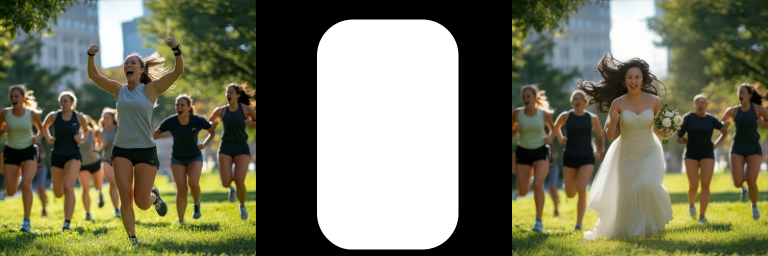
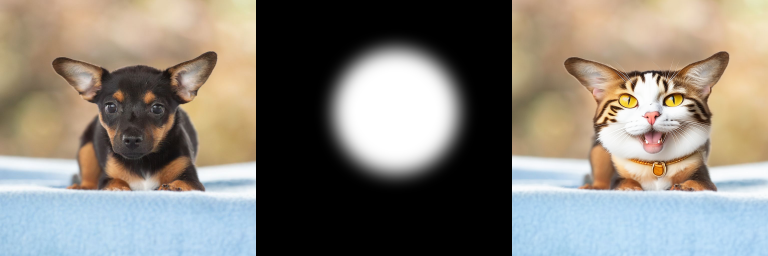
To get a smoother transition between the edited area and the original background, you can blur the mask before processing:
mask_image = load_image("mask.png")
blurred_mask = pipeline.mask_processor.blur(mask_image, blur_factor=33)
OUTPAINTING
Outpainting extends an image beyond its original boundaries. It works by using the inpainting pipeline with an inverted mask, where the “hole” covers the area outside the original content.
from PIL import ImageOps

mask_image = load_image("mask.png").convert("L")
mask_image = ImageOps.invert(mask_image)
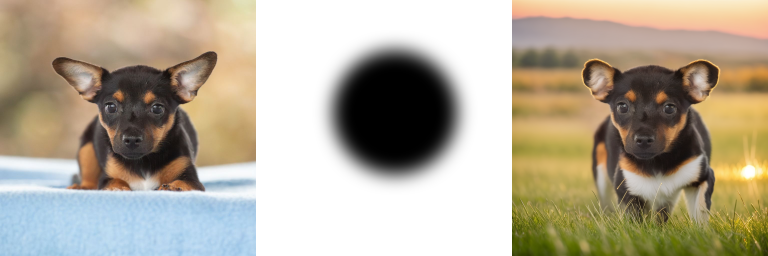
For more details, see the code used to generate the images above at Inpainting [Link].