This post is a continuation of posts Resilient Nameserver Infrastructure – The Tools [Link] and Resilient Nameserver Infrastructure – The Architecture [Link].
Those posts introduced the tools and foundational knowledge. This post builds on them to cover the security features and considerations that should be taken into account when setting up DNS.
The content of this post is based on practical experience enriched by lessons learned from NIST SP 800-81r3 – Secure Domain Name System (DNS) Deployment Guide [Link].
Why? Because DNS has shifted from a pure name-resolution utility into a security control and policy enforcement point (PEP).
Scenarios
- Recursive Resolver
- A public or private/internal resolver for clients on a network, VPN, or the open internet.
- Note: This post focuses on infrastructure and network services, not on client stub resolvers or applications with built-in DoH capabilities.
- A public or private/internal resolver for clients on a network, VPN, or the open internet.
- Authoritative Nameserver
- Generally public, but could also be a purely internal authoritative nameserver that only resolves its own zones.
- Note: It is recommended NOT to combine recursive and authoritative roles on any internet-facing server (cache-poisoning surface). NIST even recommends a “hidden primary” authoritative server.
- Generally public, but could also be a purely internal authoritative nameserver that only resolves its own zones.
Core Concepts
- DNSSEC
- A common misconception is that DNSSEC provides encryption. It does not.
- It operates during recursion, between the authoritative server (zone owner) and recursive resolvers.
- SIGNING happens at the authoritative server: the zone owner publishes RRSIG/DNSKEY records and a DS record at the parent (registrar).
- VALIDATION happens at the recursive resolver, which walks the chain of trust at each level.
- DNSSEC provides data-origin authentication and integrity.
- It protects against rogue authoritative servers (zone owner impersonation) and resolution tampering, since signatures cannot be forged.
- Encrypted DNS
- Operates on the last mile, between the client and the recursive resolver.
- DoT (DNS over TLS)
- A simple socket layer that wraps standard DNS using port 853/TCP.
- Easy to block in organisations that need to control or filter malicious or prohibited domains.
- DoH (DNS over HTTPS)
- Traffic goes over port 443/TCP (plus UDP if HTTP/3) and is indistinguishable from regular HTTPS traffic.
- Difficult for organisations to inspect or filter.
- Layer 7 packet inspection is required, with a CA certificate installed on managed devices.
- The better choice for circumventing government censorship.
- DoQ (DNS over QUIC)
- Faster because it runs over UDP on port 853 using the QUIC protocol.
- Technologically advanced, but the newest and least widely supported of the three.
- Time Accuracy
- Cryptographic technologies such as DNSSEC and TLS are time-sensitive because they include expiration and validity periods.
- It is essential to ensure nameservers have time synchronization configured and monitored.
- Other Facts
- A DNS-aware proxy is recommended but not mandatory.
- A proxy adds a layer of defence to any resolver (recursive or authoritative).
- It can offload TLS termination, apply rate-limiting, drop malicious traffic, and load-balance legitimate queries.
- Be aware that DNSSEC increases operational cost and adds CPU overhead on resolvers.
- Encrypted DNS can be used by attackers for C2 and exfiltration since the channel is hidden, which may force organisations to block external encrypted DNS.
- A DNS-aware proxy is recommended but not mandatory.
Advanced Concepts
- Protective DNS (PDNS)
- A set of measures that goes beyond blocking known malicious domains from a deny list.
- It identifies lookalikes of common domains and domains that appear to be algorithmically generated.
- It also checks the full recursive resolution chain for malicious CNAMEs and similar threats.
- It blocks malicious IPs before responding to the client.
- DNS Firewalls / Response Policy Zones (RPZ)
- Uses threat-intel feeds loaded as a secondary zone internally.
- Returns NXDOMAIN (or a sinkhole) instead of the real answer for malicious matches.
- When deployed closest to the client, it enables per-client attribution at higher operational cost.
- When deployed closest to the internet, it reduces operational cost but loses client-level visibility.
- DNS for DFIR (Digital Forensics and Incident Response)
- Log all query/response data and DHCP lease history.
- Forward logs to a SIEM/XDR/SOAR for correlation.
- Retain malicious-domain hits indefinitely.
- ODoH (Oblivious DoH)
- Hides the client’s IP address when querying for domain resolution:
- A proxy forwards requests and responses in encrypted form, so it cannot see the query content.
- The resolver cannot see the client’s IP because it is hidden behind the proxy.
- Hides the client’s IP address when querying for domain resolution:
- QNAME Minimization
- Reduces the amount of metadata disclosed at each step of recursive resolution.
- Adds a small extra query cost up front, negligible once the cache warms up.
- EDNS Padding
- Appends padding to round up the request size to a fixed block (128 or 256 bytes).
- Makes all encrypted DNS queries appear the same size, preventing traffic analysis by length fingerprinting.
RECURSIVE
WARNING: NIST is explicit (4.3) that recursive resolvers shall only be accessible internally.
- ACLs in DNSDist.
sudo nano /etc/dnsdist/dnsdist.conf
setACL({'192.168.0.0/16', '10.0.0.0/8'})
addACL('200.100.50.25/32')
sudo dnsdist --check-config
sudo systemctl restart dnsdist
- Rate Limiting (runs on every packet) in DNSDist.
-- Queries Per Second per unique IPv4.
addAction(MaxQPSIPRule(100), DropAction())
-- Or, providing the prefix lengths IPv4/IPv6.
addAction(MaxQPSIPRule(100, 32, 64), DropAction())
-- Global ceiling to a backend pool.
addAction(NotRule(MaxQPSRule(10000)), DropAction())
-- Alternatively, consider forcing TCP to mitigate spoofed UDP.
addAction(MaxQPSIPRule(50), TCAction())
OR use Dynamic Blocking (evaluates rules in a group).
local dbr = dynBlockRulesGroup()
-- If >100 QPS over 10s, block for 60s
dbr:setQueryRate(100, 10, "Exceeded query rate", 60)
-- More strict treshold based on returned code.
dbr:setRCodeRate(DNSRCode.NXDOMAIN, 20, 10, "NXDOMAIN flood", 600)
dbr:setRCodeRate(DNSRCode.SERVFAIL, 20, 10, "SERVFAIL flood", 600)
dbr:setQTypeRate(DNSQType.ANY, 2, 10, "ANY flood", 600)
-- Mitigates amplification attacks by limiting bytes/s per client.
dbr:setResponseByteRate(10000, 10, "Response bandwidth", 60)
-- Applies the Rules Group.
function maintenance()
  dbr:apply()
end
- Layer 4 Hardening in DNSDist.
setUDPTimeout(2)
setMaxTCPClientThreads(20)
setMaxTCPConnectionsPerClient(20)
setMaxTCPConnectionDuration(30)
setMaxTCPQueriesPerConnection(50)
setTCPRecvTimeout(5)
setTCPSendTimeout(5)
- Caching at the Edge with DNSDist.
-- Keeps exact queries in cache even when backend servers are not reachable.
setStaleCacheEntriesTTL(86400)
pc = newPacketCache(100000, {maxTTL=3600, minTTL=10, temporaryFailureTTL=60, staleTTL=60, keepStaleData=true})
getPool(""):setCache(pc)
- DNSSEC Validation is enabled by default on PowerDNS Recursor.
- QNAME Minimization can be enabled with a single setting.
sudo nano /etc/powerdns/recursor.conf
dnssec:
  # ...
  validation: process
recursor:
  # ...
  qname_minimization: true
pdns_recursor --config-check
sudo systemctl restart pdns-recursor
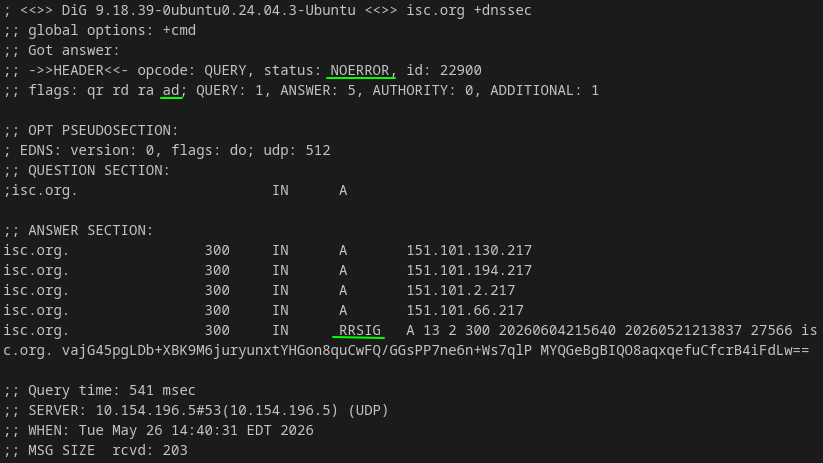
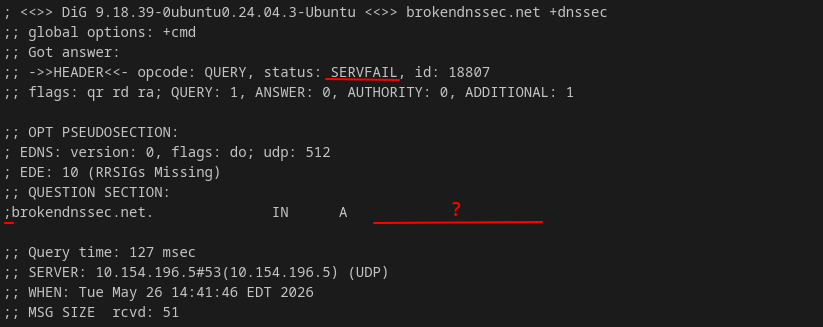
Note: process (recommended) returns SERVFAIL to the client if signature validation fails. Alternatively, log-fail still returns the result to the client while logging a warning. The config style above uses the legacy key=value syntax in .conf files. Since PowerDNS Recursor 5.x, YAML is the preferred syntax. Both are supported, but only one style can be used at a time.
Test it!
dig @127.0.0.1 isc.org +dnssec
dig @127.0.0.1 sigfail.bonne.cr +dnssec
- DoT between Client and DNSDist.
- Valid public TLS certificate
- In Strict / Authenticated mode, the client validates the certificate against the public CA chain.
- Self-signed
- Works for Opportunistic / Non-authenticated mode.
-
sudo openssl req -x509 -newkey rsa:2048 -nodes -keyout /etc/dnsdist/key.pem -out /etc/dnsdist/cert.pem -days 365 -subj "/CN=dns.home.lab" -addext "subjectAltName=DNS:dns.internal,IP:10.154.196.5"
sudo chown root:_dnsdist /etc/dnsdist/*.pem
sudo chmod 640 /etc/dnsdist/*.pem
- Valid public TLS certificate
# ...
-- DoT on 853
addTLSLocal("0.0.0.0:853", "/etc/dnsdist/cert.pem", "/etc/dnsdist/key.pem", { minTLSVersion="tls1.2" })
addTLSLocal("[::]:853", "/etc/dnsdist/cert.pem", "/etc/dnsdist/key.pem", { minTLSVersion="tls1.2" })
# ...
Test it!
dig @127.0.0.1 -p 853 +tls example.com
openssl s_client -connect 127.0.0.1:853 -showcerts
- DoH on DNSDist
-- DoH on 443
addDOHLocal("0.0.0.0:443", "/etc/dnsdist/cert.pem", "/etc/dnsdist/key.pem", "/dns-query", { minTLSVersion="tls1.2" })
addDOHLocal("[::]:443", "/etc/dnsdist/cert.pem", "/etc/dnsdist/key.pem", "/dns-query", { minTLSVersion="tls1.2" })
Test it!
dig google.com @127.0.0.1 +https
- DoQ on DNSDist
-- DoQ on UDP 853
addDOQLocal("0.0.0.0:853", "/etc/dnsdist/cert.pem", "/etc/dnsdist/key.pem", { reusePort=true })
addDOQLocal("[::]:853", "/etc/dnsdist/cert.pem", "/etc/dnsdist/key.pem", { reusePort=true })
dig does not support QUIC, so test it with:
sudo apt install knot-dnsutils -y
kdig google.com @127.0.0.1 +quic
- Forwarding TLS to Upstream Resolver with Recursor
recursor:
  # ...
  forward_zones_recurse:
    - zone: '.'
      forwarders:
        - '9.9.9.9:853'
        - '1.1.1.1:853'
outgoing:
  dot_to_port_853: true
- Blocking Known Malicious Domains with Recursor.
Pull any community-maintained list. This is the one used by Pi-hole.
curl -L https://raw.githubusercontent.com/StevenBlack/hosts/master/hosts -o /etc/powerdns/hosts.blocked
The simple way is to load the hosts file directly.
recursor:
  # ...
  etc_hosts_file: /etc/powerdns/hosts.blocked
  export_etc_hosts: true
OR
If the blocklist is a standard BIND-style Zone file:
recursor:
  # ...
  rpzs:
    - name: /etc/powerdns/hosts.blocked.rpz
      addresses: []
      defpol: NXDOMAIN
      policyName: blocklist
      extendedErrorCode: 15
      extendedErrorExtra: 'Blocked by local policy'
Apply changes without a full restart.
rec_control reload-lua-config
- Subscribe to a Published RPZ Feed in Recursor.
Verify that the remote RPZ primary zone is reachable and allows AXFR queries.
dig axfr bad-hosts.blocked @200.100.50.25
Then configure it to replicate the zone.
rpzPrimary({"200.100.50.25", "2020:1010:a:b::1"}, "malware.host.example", {
  defpol = Policy.NXDOMAIN,
  refresh = 900,
  axfrTimeout = 180,
  dumpFile  = "/var/spool/powerdns/malware.rpz",
  seedFile  = "/var/spool/powerdns/malware.rpz",
  -- If the feed uses TSIG
  -- tsigname = "...", tsigalgo = "...", tsigsecret = "..."
})
- Other Settings in DNSDist.
-- Drop queries with no Recursion-Desired flag.
addAction(NotRule(RDRule()), RCodeAction(DNSRCode.REFUSED))
-- Mitigates amplification/fragmentation by setting a EDNS UDP payload size.
setPayloadSizeOnSelfGeneratedAnswers(1232)
-- Drops if >5 labels (names separated by dots) and >100 characteres.
addAction(QNameLabelsCountRule(1, 5), DropAction())
addAction(QNameWireLengthRule(1, 100), DropAction())
-- Delay forwarding TXT type if too frequent. Potential tunneling going on.
local tunnel_delay = MaxQPSIPRule(5, 32, 128)
addAction(AndRule({tunnel_delay, QTypeRule(DNSQType.TXT)}), DelayAction(1000))
AUTHORITATIVE
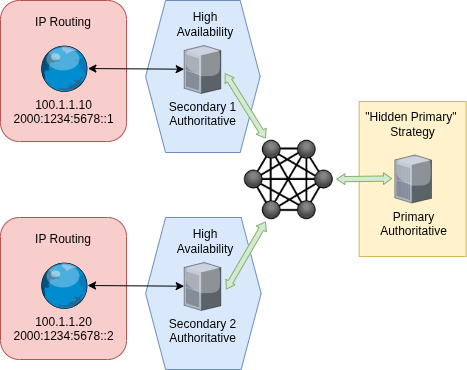
- Hidden Primary
- The primary must not be listed in the NS RRset; only secondaries are visible (publicly known and reachable).
- See this strategy in the previous post DNS: HA plus Hidden Primary [Link].
- ACLs
- Restrict AXFR (Full) and IXFR (Incremental) zone transfers to known secondaries.
- Only accept NOTIFY (which triggers zone transfers) from the hidden primary.
- Only accept Dynamic Updates from authorised senders (e.g., DHCP, Active Directory).
- Confidentiality and Integrity
- Cryptographically authenticate with TSIG (symmetric key) or SIG(0) (public key).
- Add ZONEMD as a zone-content digest. Unlike DNSSEC, which signs per record, ZONEMD signs the entire zone.
- Use XoT (zone transfer over TLS) for confidentiality.
- Denial of Existence
- Prefer plain NSEC over NSEC3, as NSEC3 does not truly prevent zone-walking and adds overhead.
- Zone Drift / Zone Thrash (SOA RR)
- Refresh and Retry set too high:
- Zone data drifts because changes take too long to propagate.
- Refresh and Retry set too low:
- High-frequency syncing can cause performance degradation and potential DoS due to increased load.
- Refresh and Retry set too high:
- TTL Sizing
- Record TTLs should be below the RRSIG TTL, but never set to 0.
- Use short TTLs on DS/DNSKEY records for faster emergency key rollover propagation.
- Information-leakage Hygiene
- Remove HINFO (Host Information), RP (Responsible Person), and LOC (Location) records to reduce recon surface.
- Regularly audit records and delegations for dangling or stale entries.
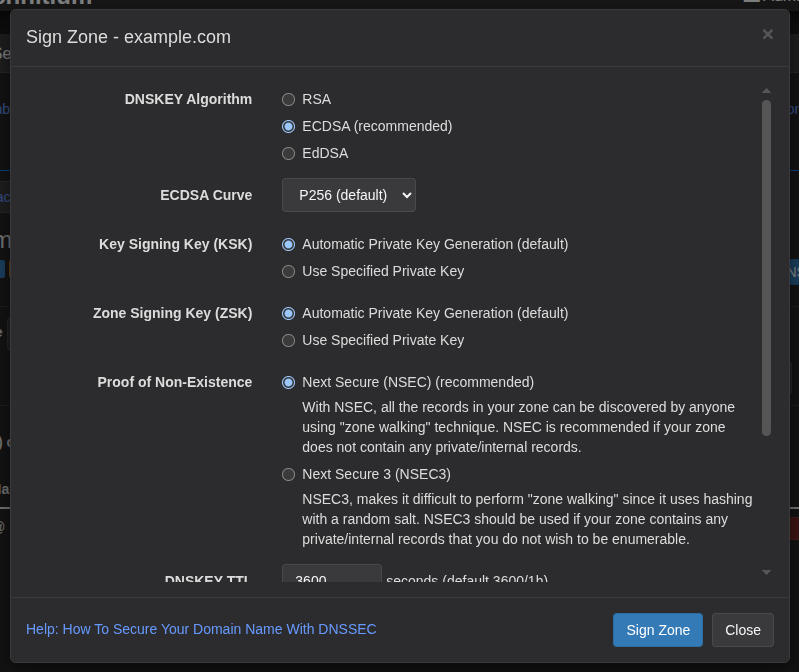
- Before enabling DNSSEC, choose the appropriate parameters.
- Prefer ECC over RSA: smaller keys and signatures help keep responses under the UDP size limit.
- Limit key lifetimes to 1 to 3 years, and keep RRSIG validity short (5 to 7 days) to limit the blast radius of a compromised key.
- Consider storing KSKs (Key-signing Keys) in an HSM for important zones.
- Do not sign internal zones. Use an encrypted private resolver with split-zone instead.
- Enabling DNSSEC
As mentioned earlier, setting up DNSSEC involves creating keys on the authoritative server and adding their fingerprints at the parent zone (typically the registrar). On the recursive resolver side, enabling validation requires no additional key management.
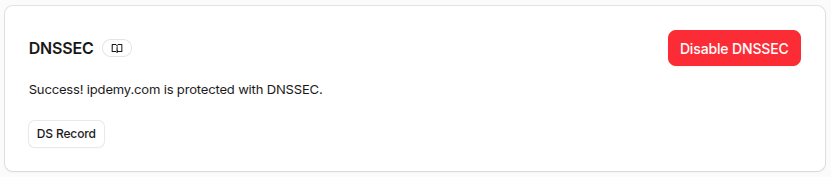
In this example, the domain is not registered through Cloudflare, but is hosted there. The concept is the same whether using PowerDNS, Technitium, cPanel, GoDaddy, or any other provider.
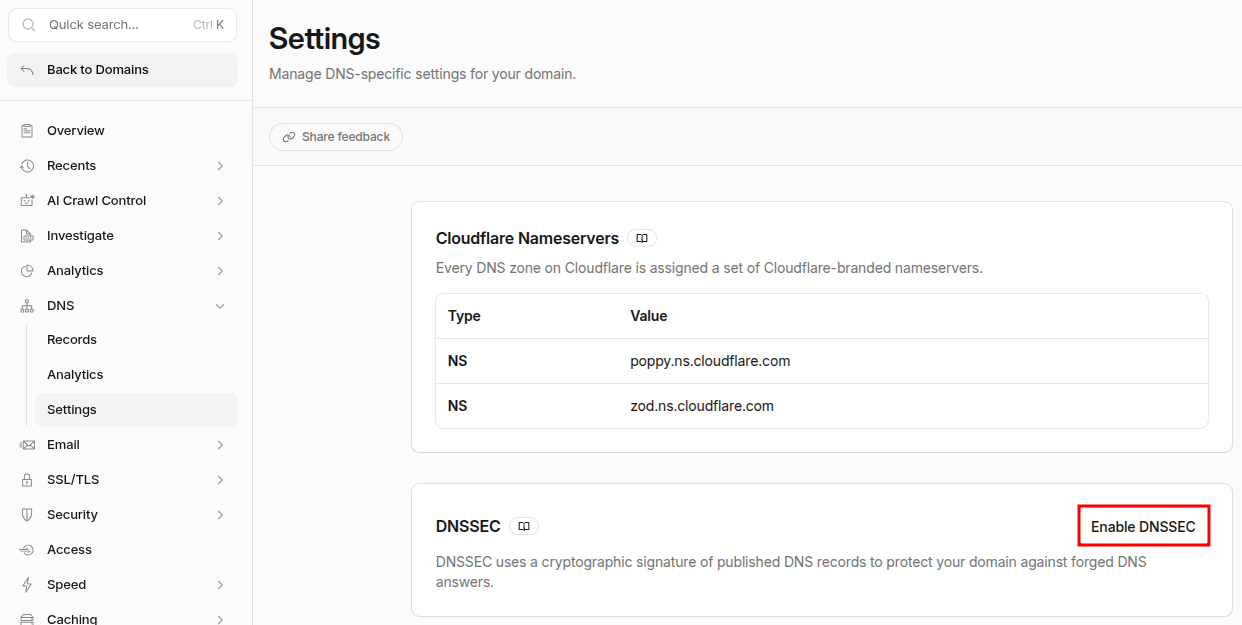
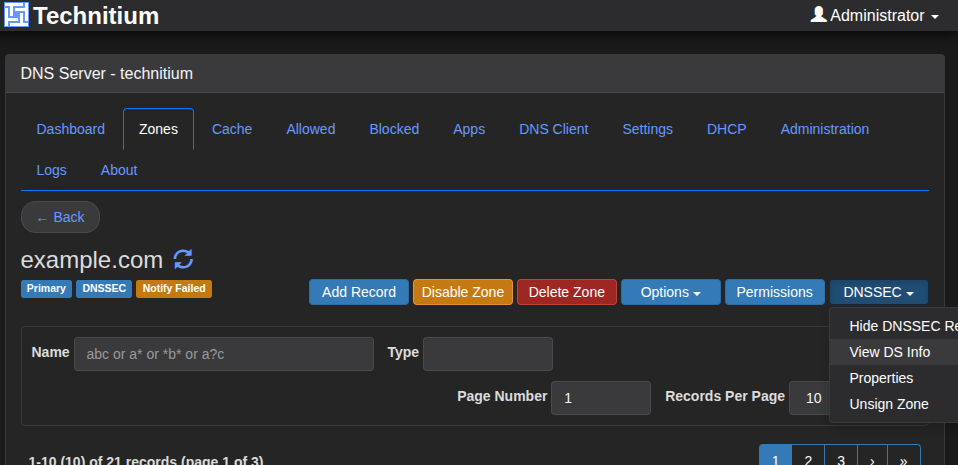
This will run the necessary routines to generate the keys inside the authoritative server.
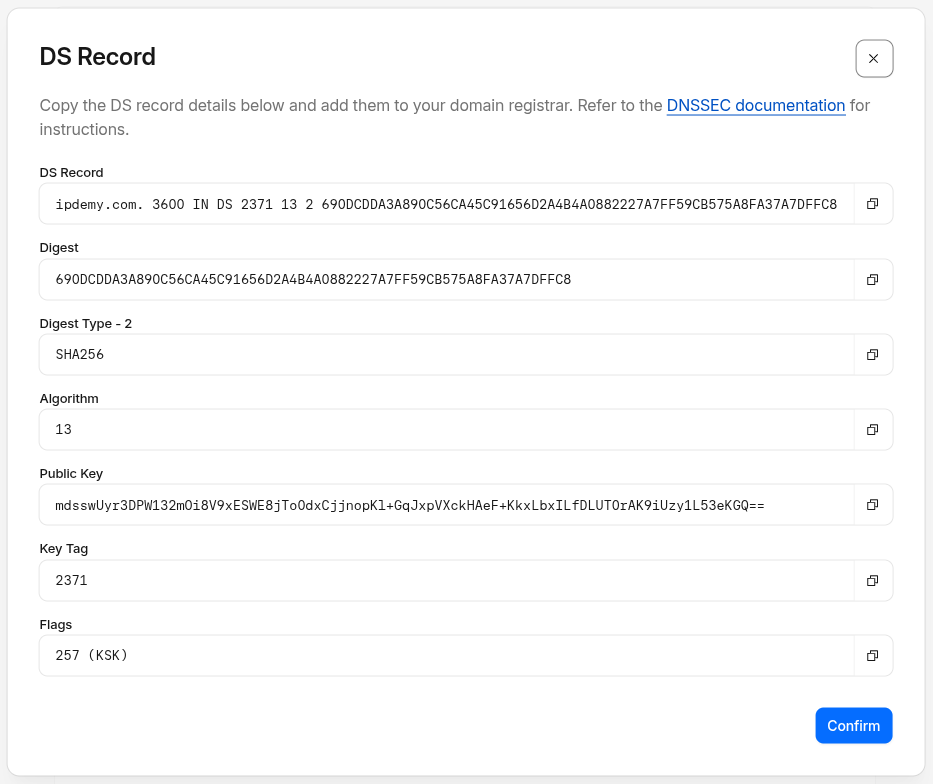
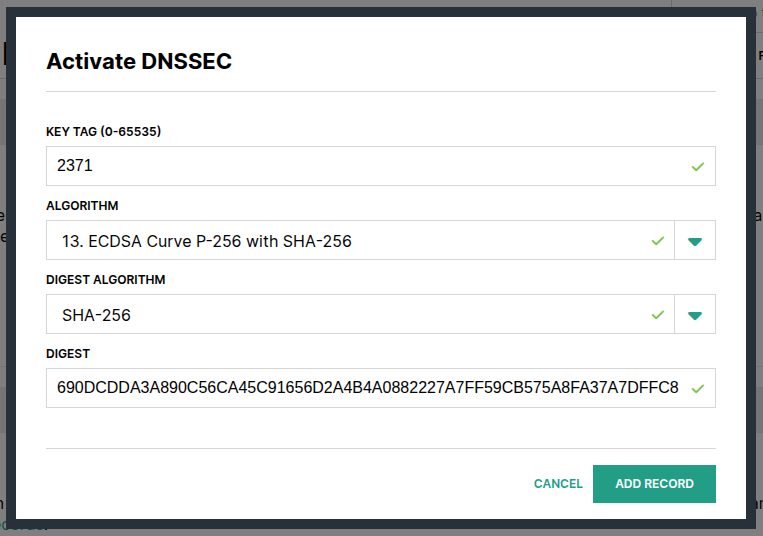
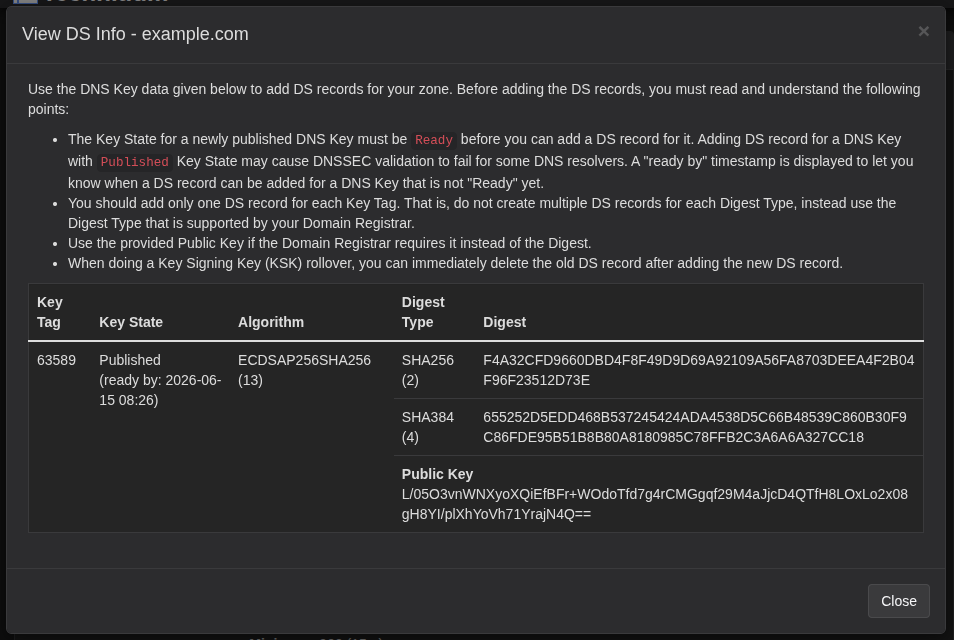
The output is a set of parameters used to configure the parent in the DNS chain. Here is how it looks on Hover.
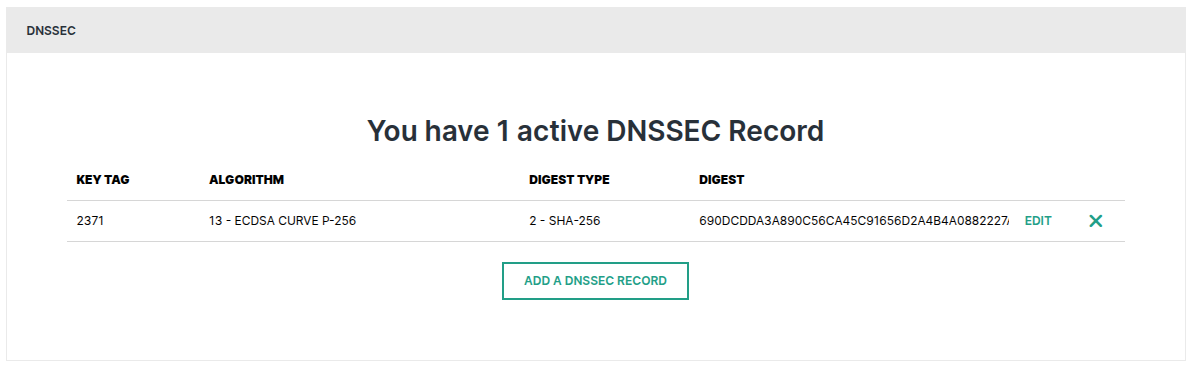
It will remain in a pending state for about 30 minutes.
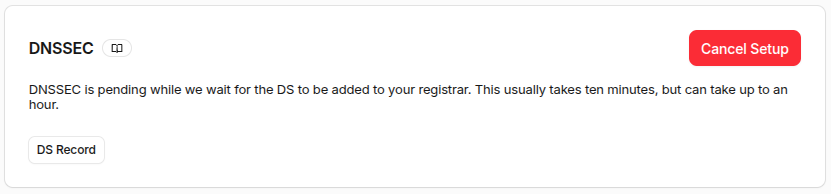
Then it will show as completed.
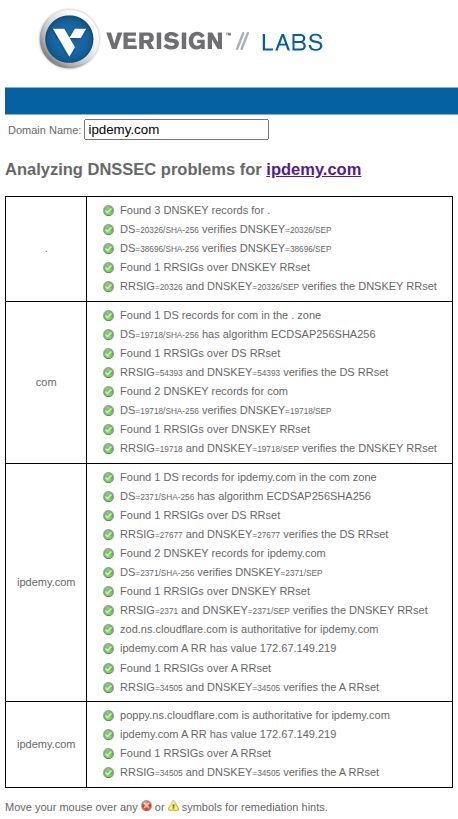
There are plenty of online tools for testing and diagnosing DNSSEC. See Verisign Labs [Link].
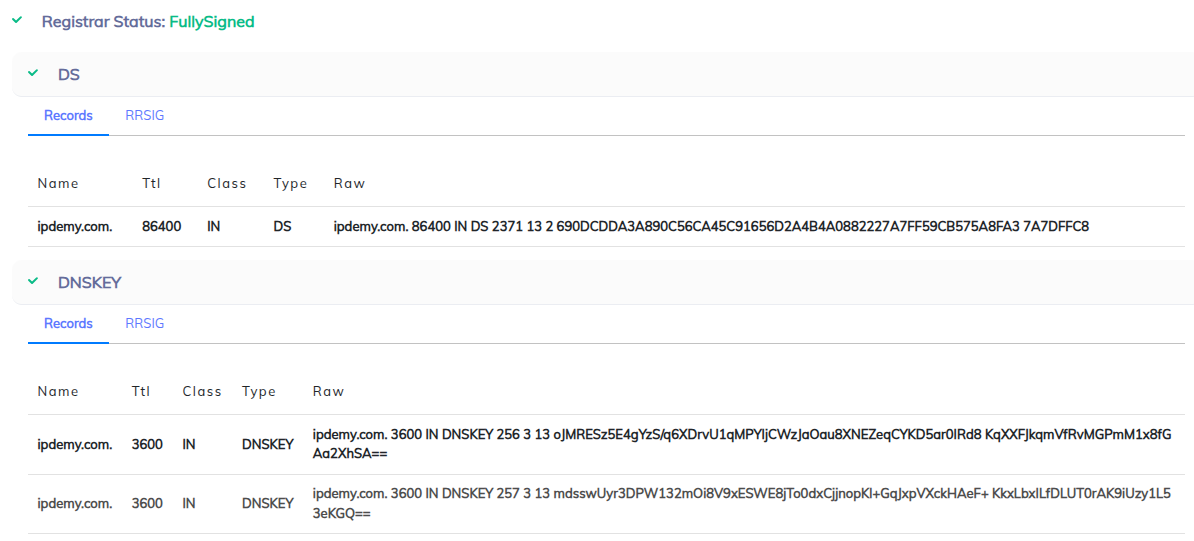
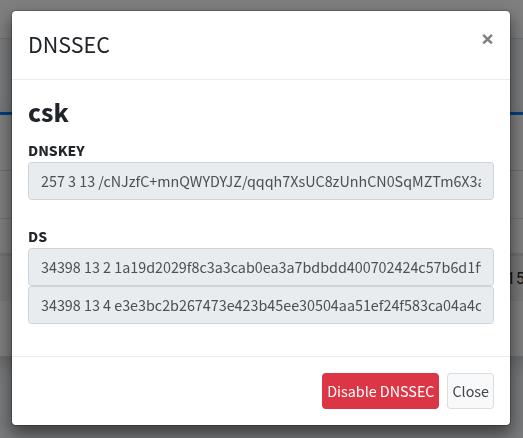
Only four fields are required: KEY-TAG, ALGORITHM, DIGEST-ALGORITHM, and the DIGEST. Some registrars may use more or fewer parameters. See example:
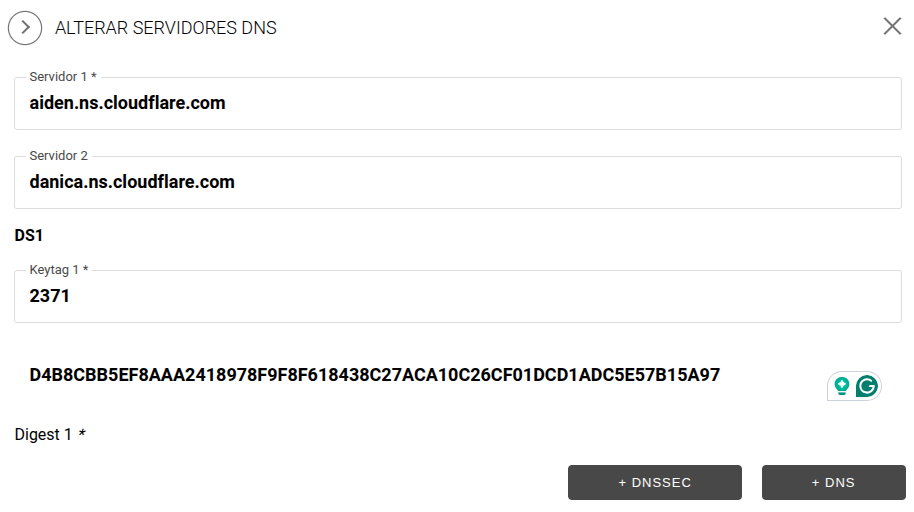
Some registrars may not support this feature at all. What a shame!

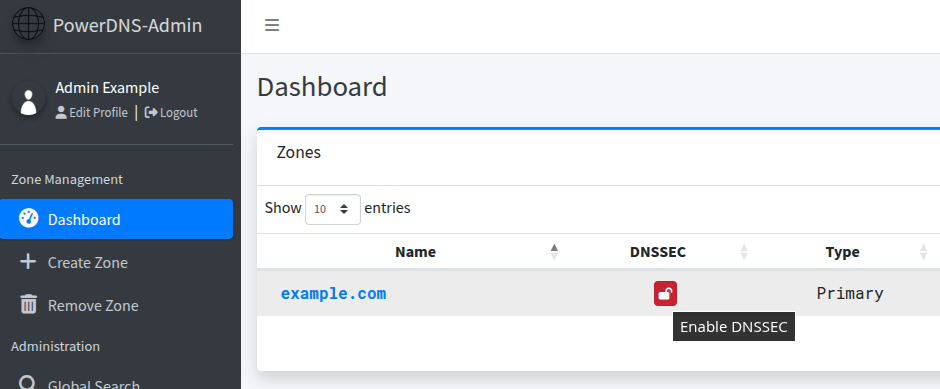
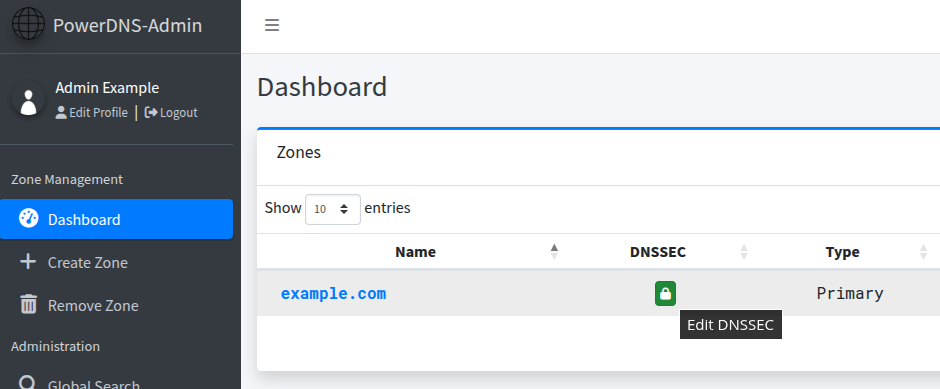
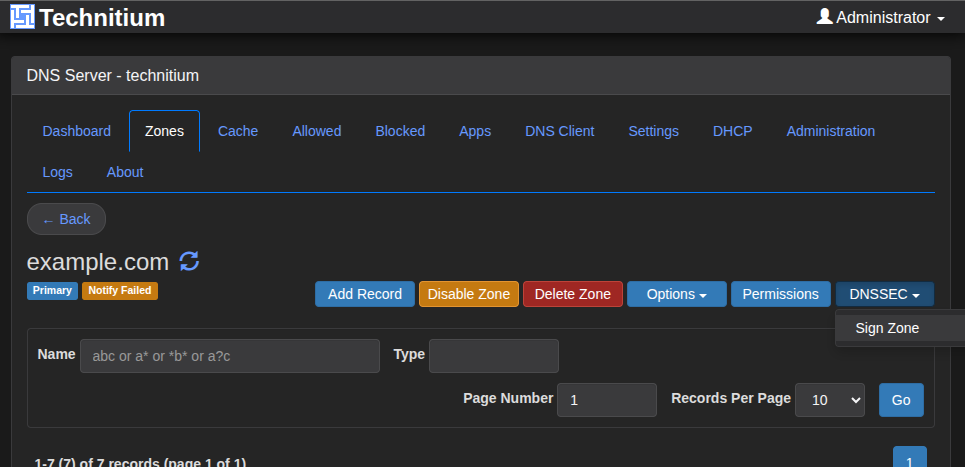
For self-hosters, here is how to enable DNSSEC on Technitium and PowerDNS.
Key Points to Remember
- DNS is a security control, not just a name-resolution service.
- Defense-in-depth turns DNS into a policy enforcement point and a source of visibility.
- Protective DNS blocks malicious domains before the connection ever starts.
- Encrypted DNS (DoT, DoH, DoQ) protects the channel between client and recursive resolver for confidentiality, not integrity.
- DNSSEC protects data integrity by signing and validating records. It is not encryption.
- DFIR log feeds can integrate with the broader security stack, including SIEM, XDR, and SOAR.