IPv6 environments are becoming increasingly popular as the Internet runs out of IPv4 addresses. However, not all ISPs support dual-stack. Developers and cybersecurity researchers need IPv6 for better network visibility, testing, and to build practical skills.
NorthSec’s annual hacking competition uses an exclusively IPv6 environment, with no IPv4 support. This forward-thinking design highlights the shift toward the next-generation internet protocol and its unique challenges. It may seem trivial, but many tools surprisingly do not work in IPv6-only networks. See section IPv6 of the post Getting Reverse Shells [Link].
To bridge the gap between IPv4-only ISPs and the growing need for IPv6 connectivity, tunnel brokers like Hurricane Electric and Route64 offer FREE IPv6-over-IPv4 tunnels.
BASICS
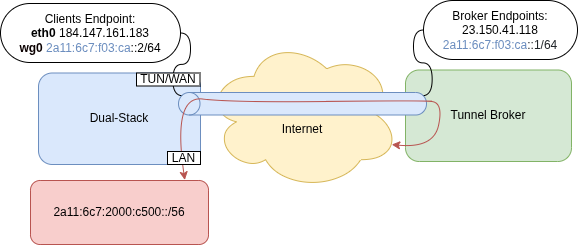
Note: the IPs starting with 2a11:6c7:f03:ca:: are used only for the tunnel itself, while 2a11:6c7:2000:c500::/56 is the subnet advertised via BGP.
On the LAN, SLAAC (Stateless Address Auto-configuration) is used to advertise IPv6 configuration parameters (/64 only). Unlike DHCP, it periodically advertises itself, allowing clients to assign their own IP.

The example below shows how a client uses parts of its MAC address to build the Interface ID of its global and link-local addresses.

A packet capture with tcpdump -n -i eth0 ip6 may reveal SLAAC communication:

Some special IPv6 address ranges:
fe80::/10– link-localff00::/8– multicast2000::/3– global unicast
Popular FREE IPv6-over-IPv4 providers:
- Hurricane Electric [Link]
- Offers a
/48prefix over a SIT tunnel (Simple Internet Transition) using IPv4 protocol 41 from 40+ locations.
- Offers a
- Route64 [Link]
- Offers a
/56prefix over multiple protocols (including WireGuard) from 8 locations.
- Offers a
- SixXS / Gogo6 / Freenet6 / gogoCLIENT – Mostly Defunct
IPv6 ONLY ENVIRONMENT
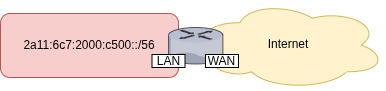
The router is responsible for establishing the tunnel and forwarding traffic in and out of the IPv6-only network.
In this example, Route64 is the IPv6 block provider. Register for a new account at [Link].
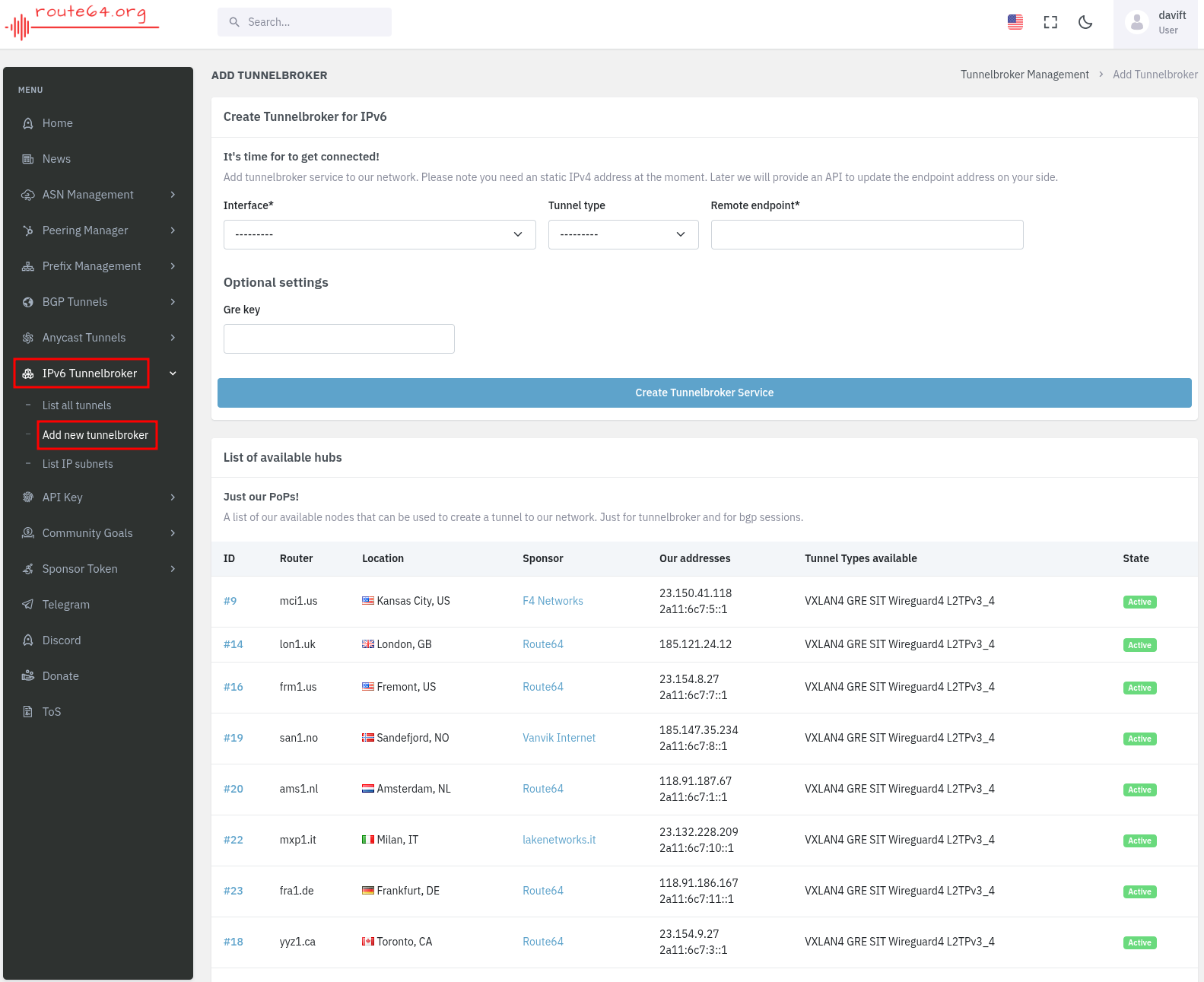
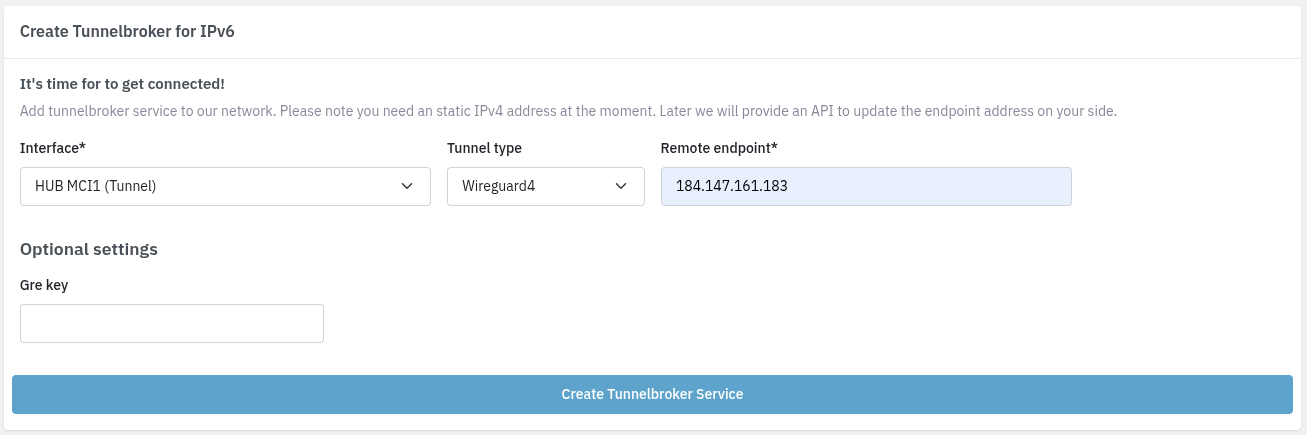
Create a Tunnelbroker for IPv6.
Click Show Config.
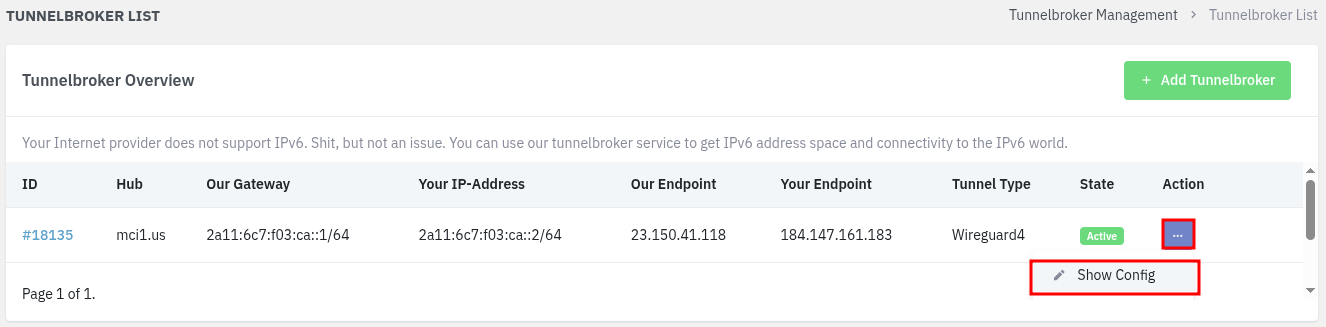
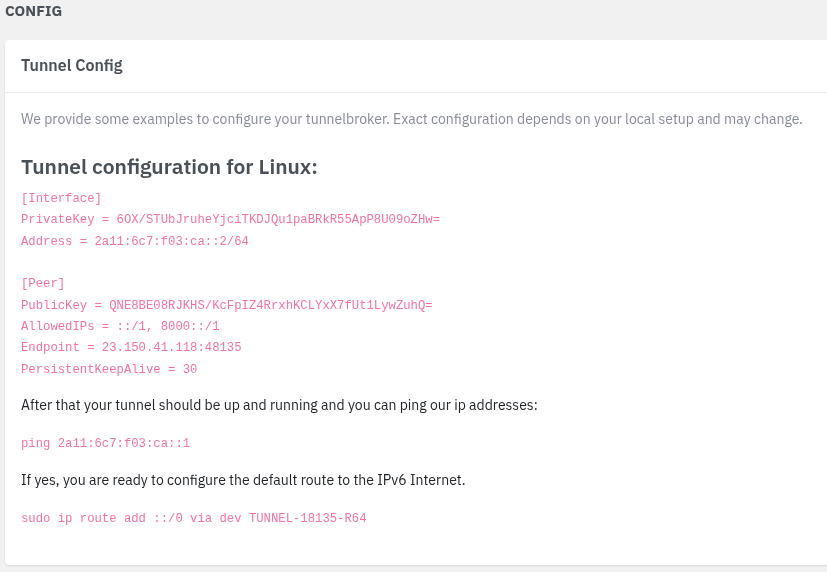
Under List IP Subnets, the block starting with 2a11:6c7:2000:c500:: is the subnet for the IPv6-only network.
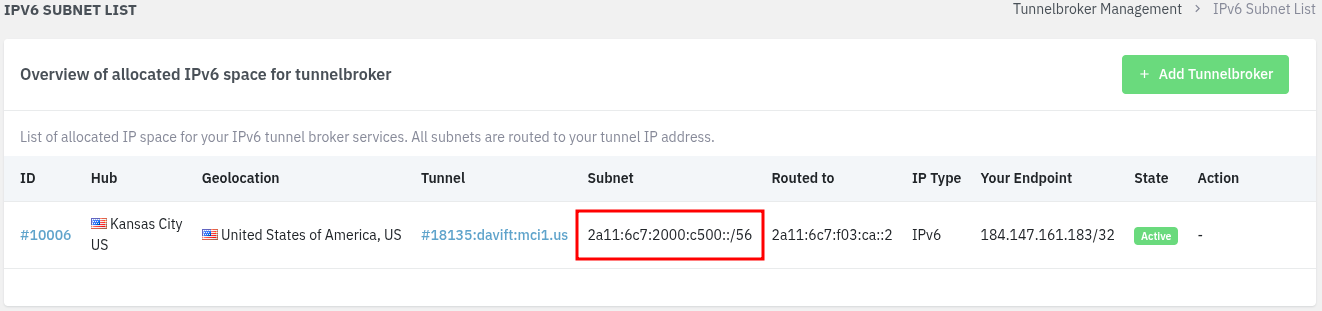
Note: the IPs starting with 2a11:6c7:f03:ca:: are used only for the tunnel itself, while 2a11:6c7:2000:c500::/56 is the subnet advertised via BGP.
LINUX ROUTER
On Ubuntu, install and configure WireGuard.
apt update && apt install wireguard -y
nano /etc/wireguard/wg0.conf
[Interface]
PrivateKey = 6OX/STUbJruheYjciTKDJQu1paBRkR55ApP8U09oZHw=
Address = 2a11:6c7:f03:ca::2/64
PostUp = ip6tables -A FORWARD -i eth0 -o wg0 -j ACCEPT
PostUp = ip6tables -A FORWARD -i wg0 -o eth0 -j ACCEPT
PostDown = ip6tables -D FORWARD -i eth0 -o wg0 -j ACCEPT
PostDown = ip6tables -D FORWARD -i wg0 -o eth0 -j ACCEPT

[Peer]
PublicKey = QNE8BE08RJKHS/KcFpIZ4RrxhKCLYxX7fUt1LywZuhQ=
AllowedIPs = ::/1, 8000::/1
Endpoint = 23.150.41.118:48135
PersistentKeepAlive = 30
Enable it to start automatically on boot.
systemctl enable --now wg-quick@wg0
Test the IPv6 tunnel connection.
wg
ip -6 a
ip -6 r
ping 2606:4700:4700::1001
curl ip.me --interface wg0
curl ip.me --interface 2a11:6c7:2000:c500::1
curl https://42.be/
Enable IPv6 forwarding between interfaces.
echo "net.ipv6.conf.all.forwarding=1" >> /etc/sysctl.conf
echo "net.ipv6.conf.default.forwarding=1" >> /etc/sysctl.conf
Apply and verify.
sysctl -p
sysctl -a | grep forward | grep ipv6
Configure both network adapters with Netplan.
nano /etc/netplan/50-cloud-init.yaml
network:
  version: 2
  ethernets:
    eth1:                    # WAN
      dhcp4: true
      dhcp6: false
      accept-ra: false
    eth0:                    # LAN
      dhcp6: false
      addresses:
        - 2a11:6c7:2000:c500::1/64
      accept-ra: false
      dhcp4: false
Note: the IP 2a11:6c7:2000:c500::1 belongs to the acquired subnet. Do not confuse it with the tunnel range.
netplan try
netplan apply
Advertise the IPv6 network to the isolated network using SLAAC.
apt install radvd -y
nano /etc/radvd.conf
interface eth0 {
  AdvSendAdvert on;
  MaxRtrAdvInterval 600;
  MinRtrAdvInterval 200;
  AdvDefaultLifetime 600;
  prefix 2a11:6c7:2000:c500::/64 {
    AdvOnLink on;
    AdvAutonomous on;
    AdvRouterAddr on;
  };
  RDNSS 2606:4700:4700::1001 {
    AdvRDNSSLifetime 1200;
  };
};
Note: the prefix must be a /64 for radvd to work.
systemctl restart radvd
systemctl status radvd
Test the connection from any client on the internal network.
curl ip.me
Note: the client must be able to resolve and reach the given address. It will return its own IP, not the router’s WAN IP as it would with IPv4 NAT.
SIT ALTERNATIVE
SIT (Simple Internet Transition) encapsulates IPv6 packets inside IPv4 packets with no encryption. It is not a translation, unlike SIIT.
In this example, Hurricane Electric is the IPv6 block provider. Register for a new account at [Link].
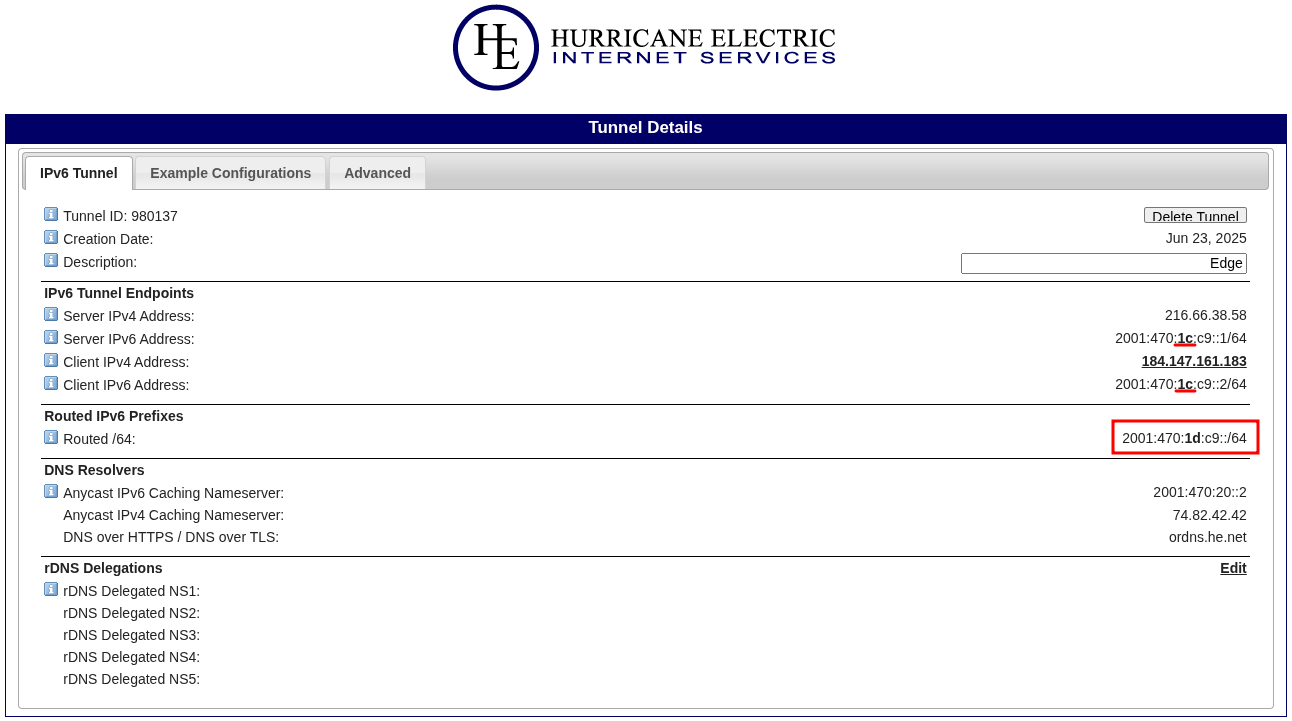
Note: the difference between the tunnel IP (c1) and the public subnet (1d) is highlighted in bold.
Select the option matching your system or router, and copy the configuration.
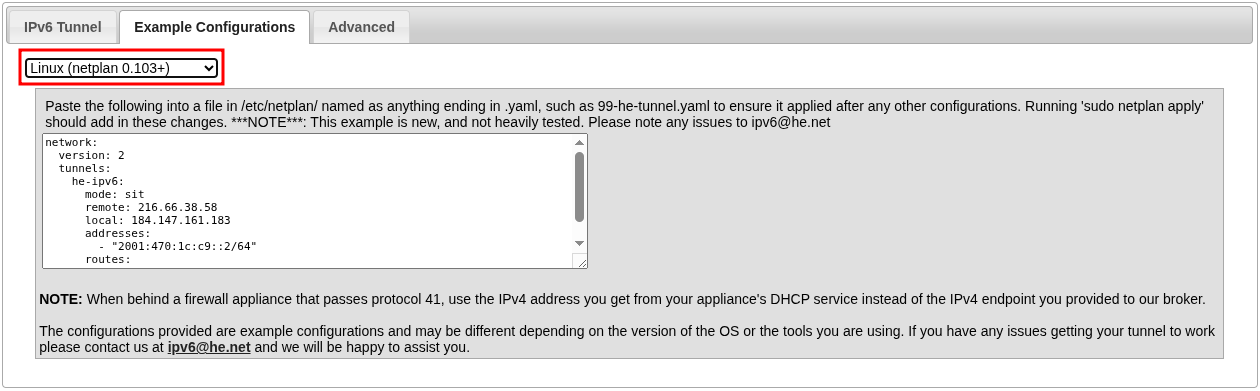
The Netplan configuration includes an additional block for tunnels.
nano /etc/netplan/50-cloud-init.yaml
network:
  version: 2
  ethernets:
    eth1:                    # WAN
      dhcp4: true
      dhcp6: false
      accept-ra: false
    eth0:                    # LAN
      dhcp6: false
      addresses:
        - 2a11:6c7:2000:c500::1/64
      accept-ra: false
      dhcp4: false
  tunnels:
    he-ipv6:
      mode: sit
      remote: 216.66.38.58
      local: 184.147.161.183
      addresses:
        - "2001:470:1c:c9::2/64"
      routes:
        - to: default
          via: "2001:470:1c:c9::1"
netplan try
netplan apply
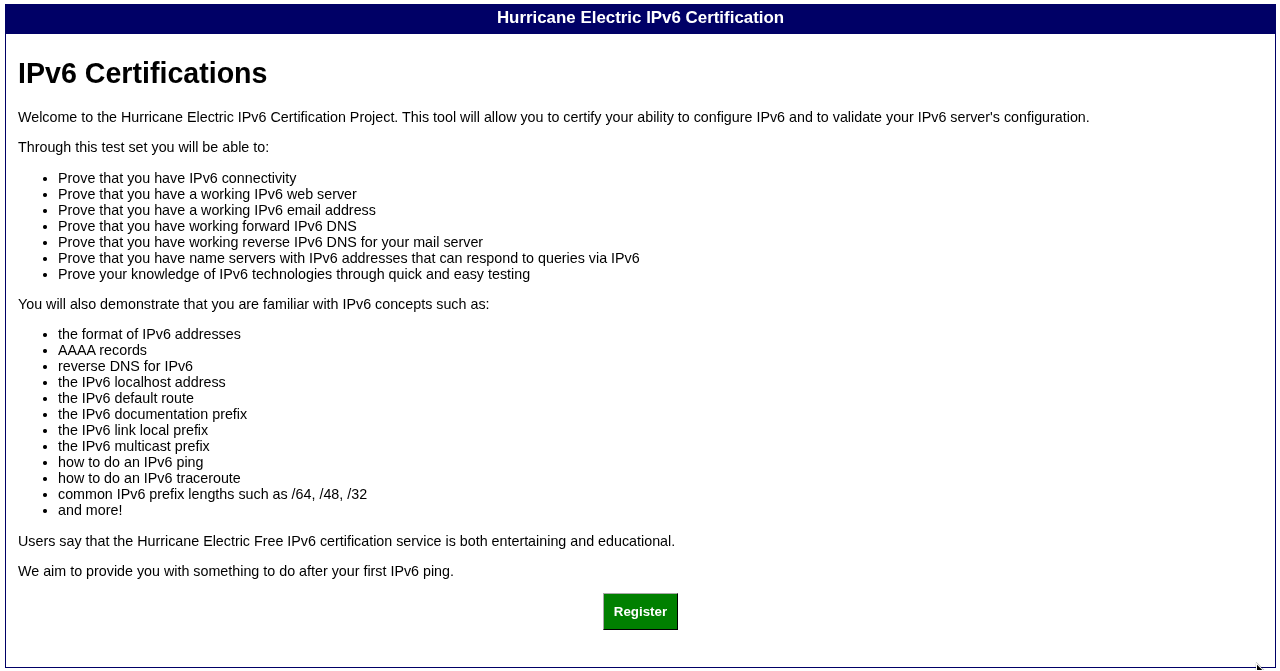
The rest is the same as before. Take some time to work through the challenges for an IPv6 Certification. It is definitely fun!
BONUS
IPv6 Syntax
IPv6 addresses often need to be enclosed in square brackets to avoid ambiguity with port numbers.
curl http://[2001:470:1c:c9::2]:8080
For link-local addresses, the interface must be specified after the % symbol, or %25 in URL encoding.
ping fe80::1%eth0
browser http://[fe80::1%25eth0]
SEE ALSO
Dual-Stack and NATed IPv6 Networking on Linux [Link].