EIGRP is a Cisco proprietary protocol that shares all known networks between routers and calculates the best path based on link-state, hop count, and bandwidth. Each router only knows about its direct neighbors.
Given the scenario below, PC1 needs to reach PC2:
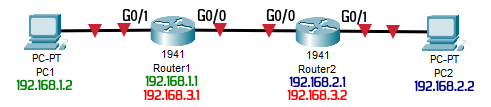
Router1
enable
configure terminal
hostname Router1
no ip domain lookup
line con 0
logging synchronous
interface g0/0
ip address 192.168.3.1 255.255.255.252
no shutdown
interface g0/1
ip address 192.168.1.1 255.255.255.0
no shutdown
router eigrp 10
no auto-summary
network 192.168.1.0 0.0.0.255
network 192.168.3.0 0.0.0.3
passive-interface g0/1
Router2
enable
configure terminal
hostname Router2
no ip domain lookup
line con 0
logging synchronous
interface g0/0
ip address 192.168.3.2 255.255.255.252
no shutdown
interface g0/1
ip address 192.168.2.1 255.255.255.0
no shutdown
router eigrp 10
no auto-summary
network 192.168.2.0 0.0.0.255
network 192.168.3.0 0.0.0.3
passive-interface g0/1
The router acting as the gateway to outside the network needs the following configuration:
ip route 0.0.0.0 0.0.0.0 g0/1

router eigrp 10
  network 0.0.0.0
  redistribute static
This tells all other routers which one is the ‘gateway of last resort‘ when a destination network is unknown.
To verify the configuration on each router, use the following commands:
do show ip eigrp neighbors
do show ip route eigrp
do show ip eigrp topology
do show ip protocols
Learn more about [EIGRP – CertBros]
The previous post was about RIPv2 [Read It].
The following post is about OSPF [Read It].