GlusterFS is an open-source distributed storage platform developed by Red Hat, designed for scale-out storage in both public and private cloud environments.
While modern applications are increasingly scalable thanks to container orchestrators like Kubernetes, persistent and shared storage often struggles to scale in the same way.

By using a distributed file system like GlusterFS, you can achieve resilience through data replication across multiple servers. Additionally, performance can be improved by distributing and striping data, enabling simultaneous read and write operations across many servers.
- Replicated
- The same file is copied on each server for redundancy.
- Distributed (default)
- Files are spread over multiple servers for best throughput.
- Dispersed
- An encoded fragment of the file is stored on each brick, but only a subset of fragments is needed to recover it.
- Usable_Size = Brick_Size * (Number_of_Bricks – Redundancy)
- Distributed Replicated or Distributed Dispersed
- A combination of the previous methods.
For reference, here is how they compare to RAID.
- RAID 0
- Striping with no redundancy.
- Similar to GlusterFS Distributed.
- RAID 1
- Mirroring with full copies.
- Similar to GlusterFS Replicated.
- RAID 5
- Striping with single parity.
- Similar to GlusterFS Dispersed with Redundancy of 1.
- RAID 6
- Striping with double parity.
- Similar to GlusterFS Dispersed with Redundancy of 2.
- RAID 10
- Mirroring combined with striping.
- Similar to GlusterFS Distributed Replicated.
INSTALLING GLUSTERFS SERVER
Run the following commands on all nodes in the cluster.
apt update && apt upgrade -y && apt install software-properties-common -y
add-apt-repository ppa:gluster/glusterfs-11
apt install glusterfs-server -y
systemctl enable --now glusterd
nano /etc/hosts
Append the following lines, adjusting the IPs and number of servers as needed.
10.1.1.11 g1
10.1.1.12 g2
10.1.1.13 g3
On one of the servers, run the following commands to probe its peers and add them to the cluster.
gluster peer probe g2
gluster peer probe g3
gluster peer status
On all servers, create the directories that will be used by the volumes.
mkdir -p /glusterfs/brick1
mkdir -p /glusterfs/brick2
The first volume stores data in a replicated fashion. In this example, three replicas of the same data are always maintained (200% overhead).
gluster volume create gv1 replica 3 transport tcp g1:/glusterfs/brick1 g2:/glusterfs/brick1 g3:/glusterfs/brick1 force
gluster volume start gv1
The second volume is distributed but not redundant (0% overhead). This maximizes usable storage and throughput at the cost of data integrity, making it well suited for ephemeral data such as logs.
gluster volume create gv2 transport tcp g1:/glusterfs/brick2 g2:/glusterfs/brick2 g3:/glusterfs/brick2 force
gluster volume start gv2
gluster volume info
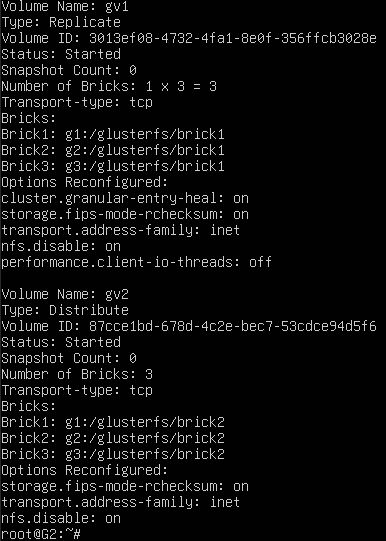
gluster volume status

For a Distributed Replicated volume, the number of bricks must be a multiple of the replica count. Example: 2 replicas and 4 bricks.
gluster volume create gv3 replica 2 g1:/brick g2:/brick g3:/brick g4:/brick
Then open the required ports on the firewall and enable it.
# Control Ports
ufw allow 24007
ufw allow 24008
# Data Ports (one for each brick, starting from 49152)
ufw allow 49152
ufw allow 49153
# Enable UFW
ufw enable
INSTALLING GLUSTERFS CLIENT
apt update && apt upgrade -y && apt install software-properties-common -y
add-apt-repository ppa:gluster/glusterfs-11
apt install glusterfs-client -y
Create the mount points for the volumes and mount them.
mkdir -p /mnt/gv1
mkdir -p /mnt/gv2
mount -t glusterfs g1:/gv1 /mnt/gv1
mount -t glusterfs g1:/gv2 /mnt/gv2
If successful, unmount them and configure automatic mounting on boot.
umount /mnt/gv1
umount /mnt/gv2
nano /etc/fstab
Add the following lines at the end.
g1:/gv1 /mnt/gv1 glusterfs defaults,_netdev,backupvolfile-server=g3 0 0
g2:/gv2 /mnt/gv2 glusterfs defaults,_netdev,backupvolfile-server=g3 0 0
Note: For volume 1, the client connects via server 1 by default, with server 3 as a fallback. For volume 2, server 2 is used by default, also with server 3 as a fallback. Once the initial connection is established, the client becomes aware of all servers and communicates with them directly and simultaneously.
Apply the fstab changes without rebooting.
mount -a
MANAGING VOLUMES
gluster volume list
gluster volume info [<VOLUME_NAME>]
gluster volume start <VOLUME_NAME>
gluster volume stop <VOLUME_NAME>
gluster volume stop <VOLUME_NAME> --mode=force
gluster volume delete <VOLUME_NAME>
Scale Out
gluster volume add-brick <VOLUME_NAME> <HOST>:/brick_path
gluster volume add-brick <VOLUME_NAME> replica <count> <HOSTS:/brick_paths...>
Scale In
gluster volume remove-brick <VOLUME_NAME> <HOST>:/brick_path start
# Wait for data evacuation
gluster volume remove-brick <VOLUME_NAME> <HOST>:/brick_path commit
Rebalance a Volume
gluster volume rebalance <VOLUME_NAME> start
gluster volume rebalance <VOLUME_NAME> status
Volume Options
gluster volume set <VOLUME_NAME> <OPTION> <VALUE>
gluster volume set gv0 performance.cache-size 256MB
Quotas
gluster volume quota <VOLUME_NAME> list
gluster volume quota <VOLUME_NAME> enable
gluster volume quota <VOLUME_NAME> limit-usage / <SIZE>
gluster volume quota <VOLUME_NAME> limit-usage /<DIR_PATH> <SIZE>
gluster volume quota <VOLUME_NAME> remove /<DIR_PATH>
gluster volume quota <VOLUME_NAME> disable
Access Control
gluster volume set <VOLUME_NAME> auth.allow <IP_1,IP_2,...>
gluster volume set <VOLUME_NAME> auth.reject <IP_1,IP_2,...>
BONUS
Create persistent storage in Kubernetes.
Service
apiVersion: v1
kind: Service
metadata:
  name: glusterfs-cluster
spec:
  ports:
  - port: 24007
    targetPort: 24007
    protocol: TCP
    name: gluster-management
Endpoint
apiVersion: v1
kind: Endpoints
metadata:
  name: glusterfs-cluster
subsets:
  - addresses:
      - ip: 10.1.1.11
      - ip: 10.1.1.12
      - ip: 10.1.1.13
    ports:
      - port: 24007
        protocol: TCP
Persistent Volume
apiVersion: v1
kind: PersistentVolume
metadata:
  name: gluster-pv
spec:
  capacity:
    storage: 10Gi
  accessModes:
    - ReadWriteMany
  persistentVolumeReclaimPolicy: Retain
  glusterfs:
    endpoints: glusterfs-cluster
    path: gv0
    readOnly: false
Persistent Volume Claim
apiVersion: v1
kind: PersistentVolumeClaim
metadata:
  name: gluster-pvc
spec:
  accessModes:
    - ReadWriteMany
  resources:
    requests:
      storage: 10Gi
  volumeName: gluster-pv